
Repertoire Teacher Observation Walkthrough & Feedback App
Repertoire makes classroom visits so fast and frictionless, you'll actually do them every day. Write and send a feedback note in under a minute — no retyping, no forgetting, no guilt.

For principals who keep saying "I need to get into classrooms more" — and mean it this time
Get Into Every Classroom, Every Week — and Send Feedback Before You Leave the Hall
Repertoire is the walkthrough app that makes classroom visits so fast and frictionless, you'll actually do them every day. Write and send a feedback note in under a minute — no retyping, no forgetting, no guilt.
14 days free · No credit card required · Cancel anytime
Sound Familiar?
You started the year with a plan to visit classrooms. By October, you're averaging maybe two a week — and feeling guilty about it.
Every visit creates follow-up work: writing up notes, finding the teacher's email, composing something thoughtful. By the time you get back to your office, three fires are waiting and the feedback never gets sent.
Teachers stop expecting to see you. Some assume no news is good news. Others assume you don't care.
You've tried notebooks, Google Forms, spreadsheets, sticky notes. Nothing sticks because nothing is fast enough to use in the hallway between the bell and the next interruption.
Another year where "instructional leadership" lives on your goal sheet but not in your daily schedule.
It’s Not a Self-Discipline Problem — It’s a Friction Problem
The principals who visit classrooms consistently aren't more disciplined or less busy — they've removed the friction. That's the insight behind Repertoire: make the visit-write-send loop so fast that there's no reason NOT to do it.
Introducing Repertoire
The Walkthrough App Built for Hallway Speed
Repertoire handles the entire classroom visit cycle — who to see, what to write, and how to send it — in a workflow designed to take less than a minute per visit.
You'll go from sporadic, guilt-driven classroom visits to a daily habit that teachers notice, appreciate, and respond to — without adding a single minute to your workday. Within a few weeks, you'll have visited every teacher on your roster, built a library of reusable feedback language, and created a written record of every observation you've done this year.
See It In Action
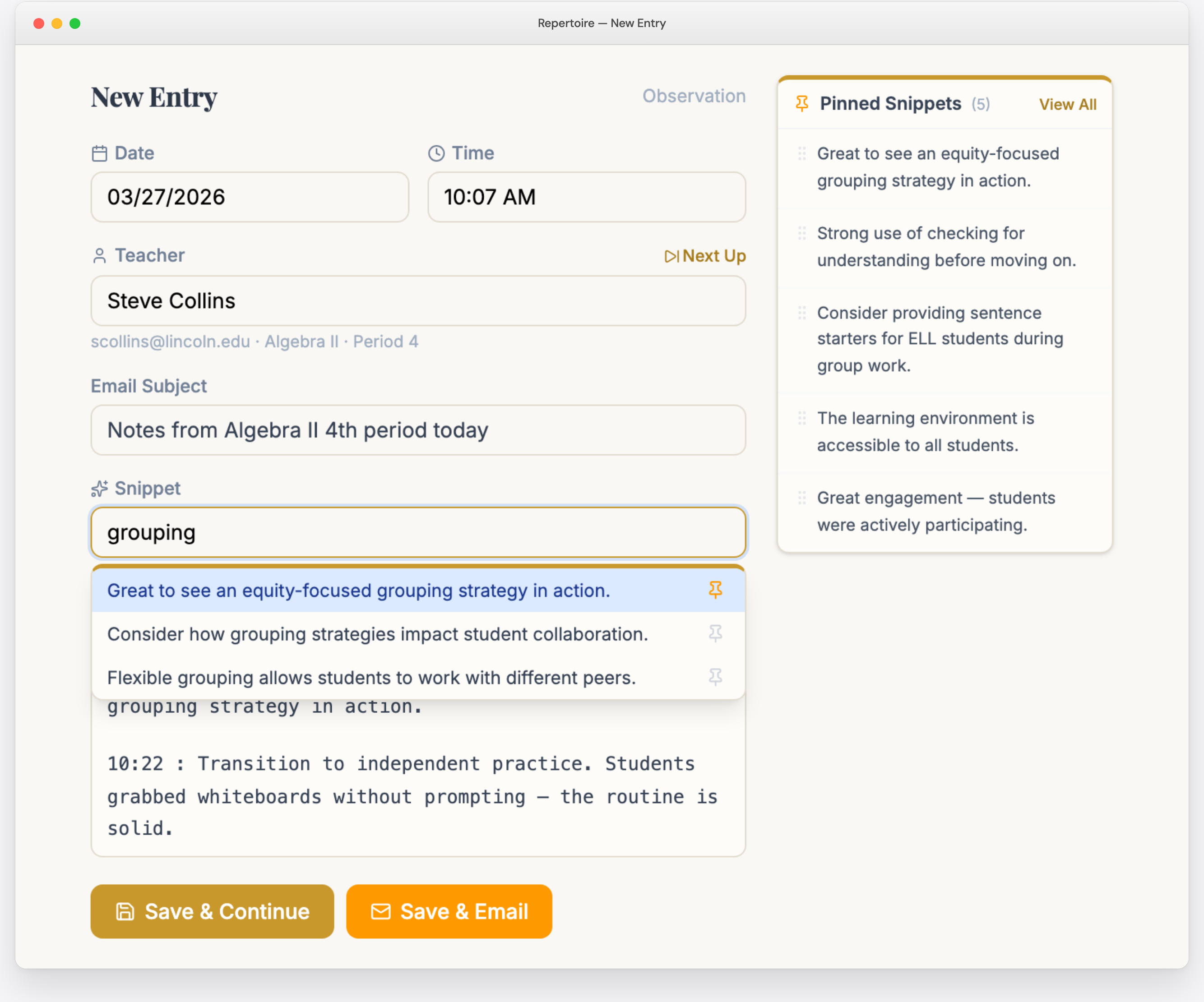
Timestamped notes as you type, reusable snippets at your fingertips, and a Save & Email button that sends feedback before you reach the next classroom.
How It Works
Four Taps. That’s It.
Load Your Roster
Paste names from a spreadsheet, or snap a photo of a printed staff list — Repertoire reads the names and builds your roster for you.
Tap Next Up
Repertoire tells you who to visit next, prioritizing teachers who've gone the longest without a visit. No thinking required.
Visit and Write
Tap snippets, record a voice memo, jot notes by hand, or forward an email — whatever's fastest in the moment.
Send Feedback
One tap sends it from your own email address before you reach the next classroom.
Key Features
Built for the Way You Actually Work
Every feature was designed for hallway speed — not desk work.
Next Up
Tells you exactly who to visit next — and the best period to go. Even coverage without a spreadsheet.
Snippets
Reusable feedback phrases you insert with a single tap. Your library builds itself as you write.
Captures
Voice memo, handwritten note, or forwarded email — Repertoire transcribes and structures it automatically.
Save & Email
Feedback comes from your real email address — not an app notification. Teachers see a note from a colleague they trust.
Next Up
Stop Deciding, Start Visiting
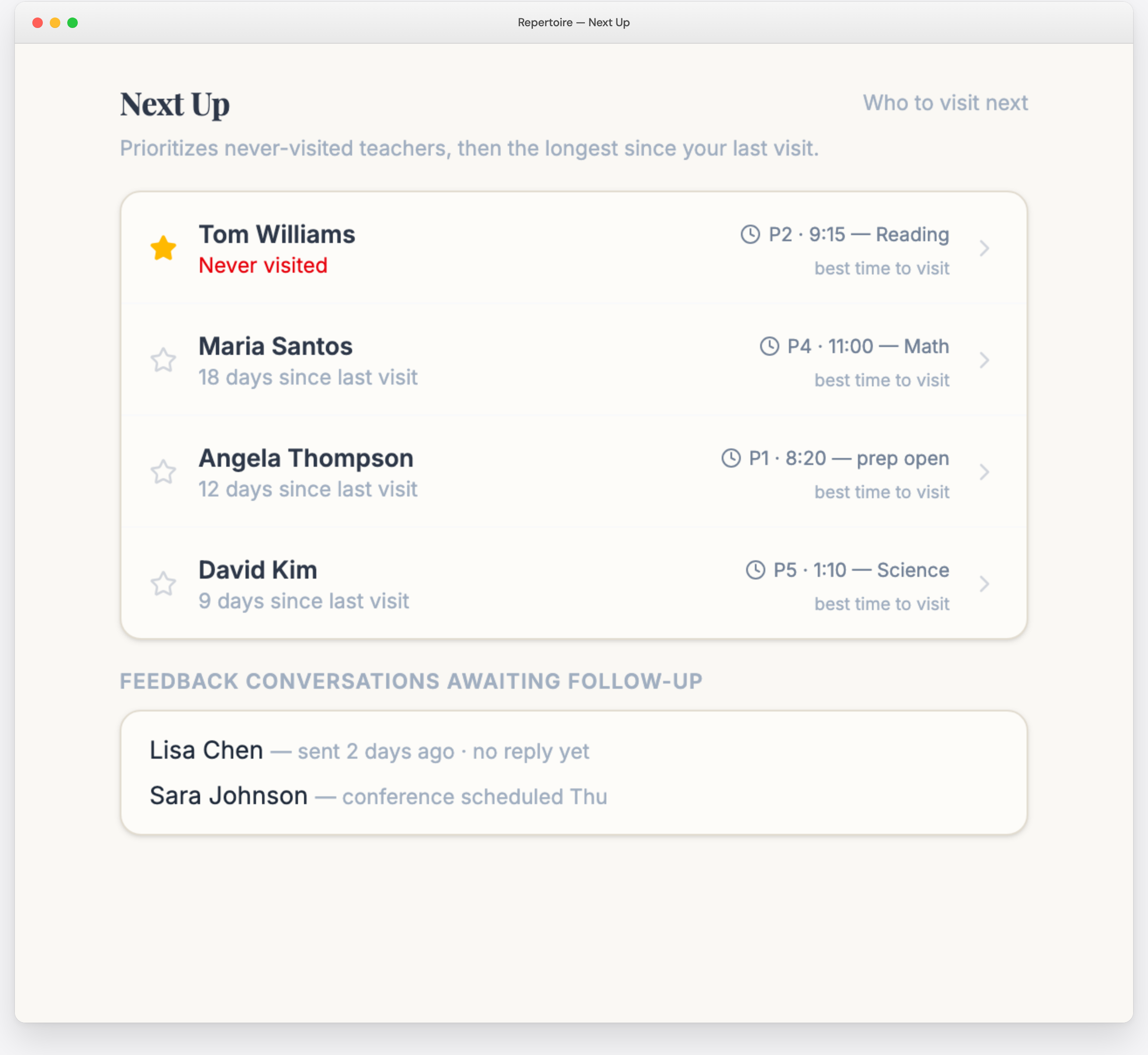
Next Up tells you exactly who to visit, prioritizing teachers who've gone the longest without a visit. Teachers you've never visited are surfaced first. You never have to consult a spreadsheet or wonder who you've missed.
It goes further than who: Repertoire knows each teacher's schedule, so it suggests the best period to visit — skipping preps and steering you toward the classes you've observed least. It even keeps a running list of feedback conversations awaiting follow-up, so nothing falls through the cracks.
Snippets
Write Feedback in Seconds, Not Minutes
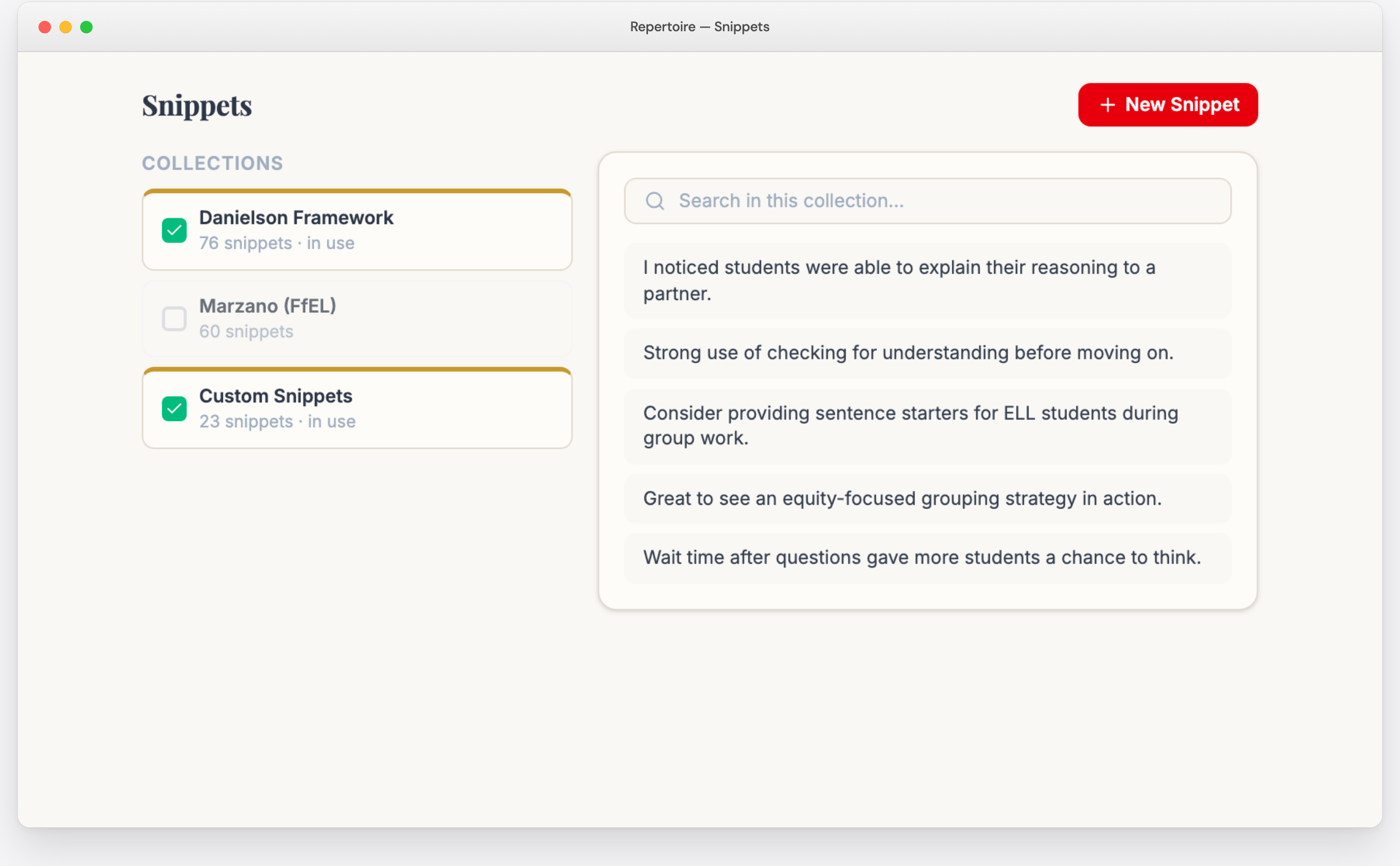
Snippets are reusable phrases you insert with a single tap: sentence starters, framework-aligned language, or full feedback statements. Each tap can log the time alongside your note, so you walk out with a minute-by-minute record of the lesson. Turn on "Save New Snippets" and your library builds itself in the first few weeks.
Repertoire includes more than 20 pre-built snippet collections aligned to major evaluation frameworks — Danielson, Marzano, T-TESS, Kim Marshall, CEL 5D+, NIET, and many state rubrics. Activate the ones your district uses and you're writing in framework language from day one. Custom framework? Snap a photo of your rubric and Repertoire imports it.
Captures
Write Zero Words and Still Send Feedback
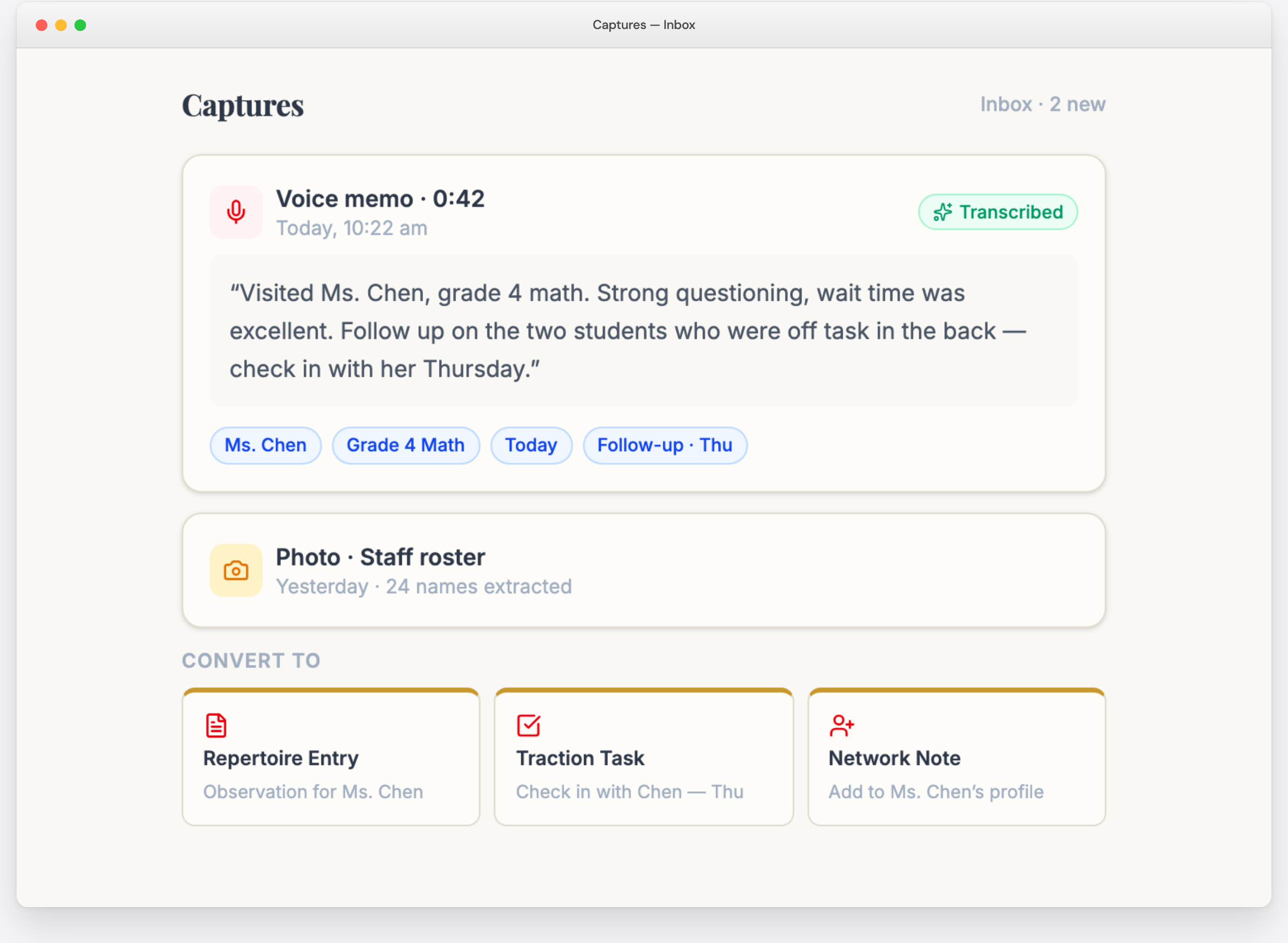
Record a voice memo in the hallway right after a visit and Repertoire transcribes it. Snap a photo of a handwritten note and it's read and structured for you. Or forward an email to your private Captures address. Any of them becomes a full entry — teacher name, date, entry type, subject, and body extracted automatically.
Captures installs on your phone's home screen like any app, so the record button is always one tap away.
Handwritten Notes
Keep the Personal Touch. Lose the Retyping.
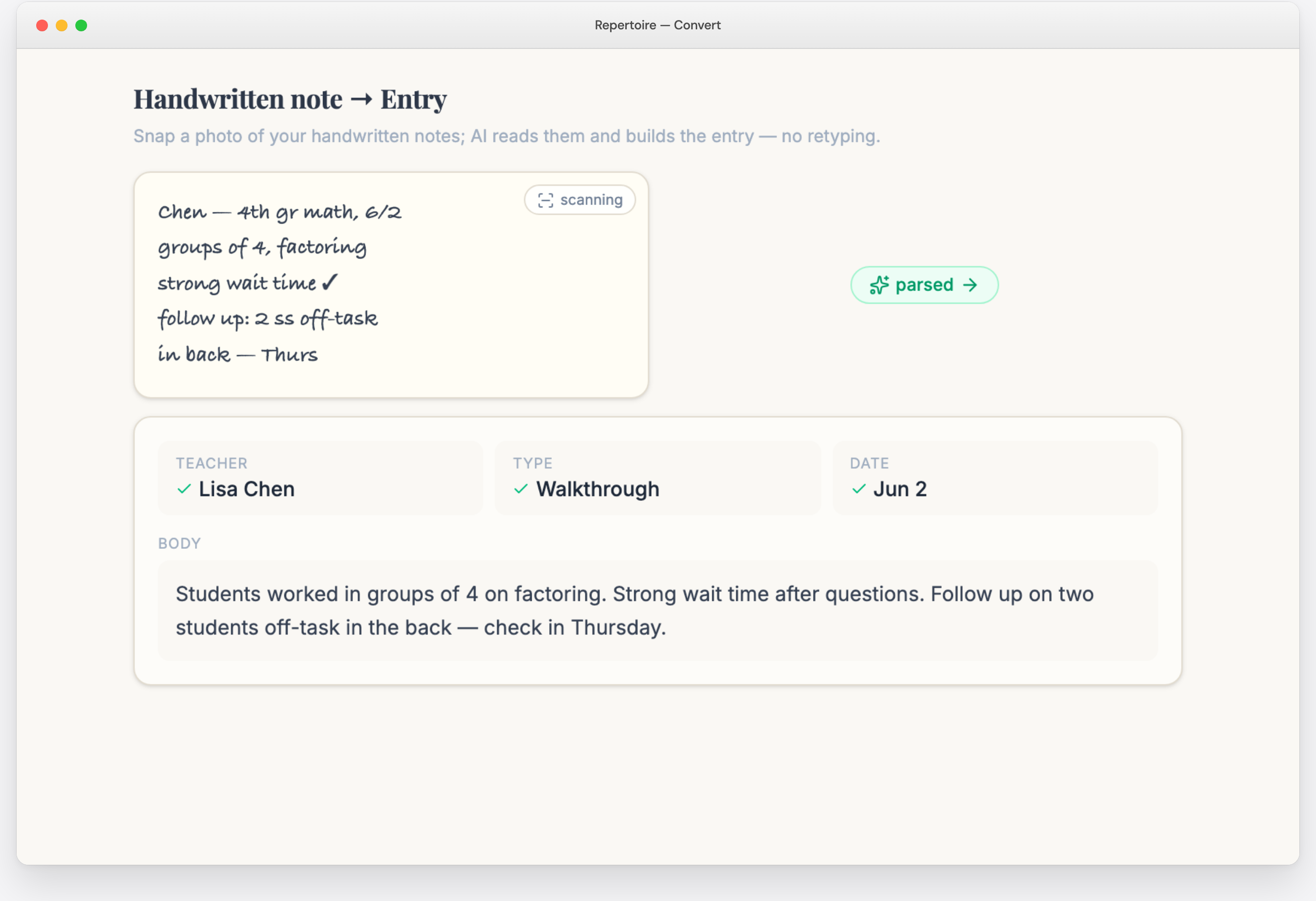
Teachers love handwritten notes for the personal touch — and plenty of principals think faster with a pen. Write your feedback by hand, snap a photo, and Repertoire reads your handwriting and builds the entry: teacher matched to your roster, date and entry type filled in, notes cleaned up into a readable body. You get a searchable digital record without retyping a word.
Save & Email
Feedback From You, Not From an App
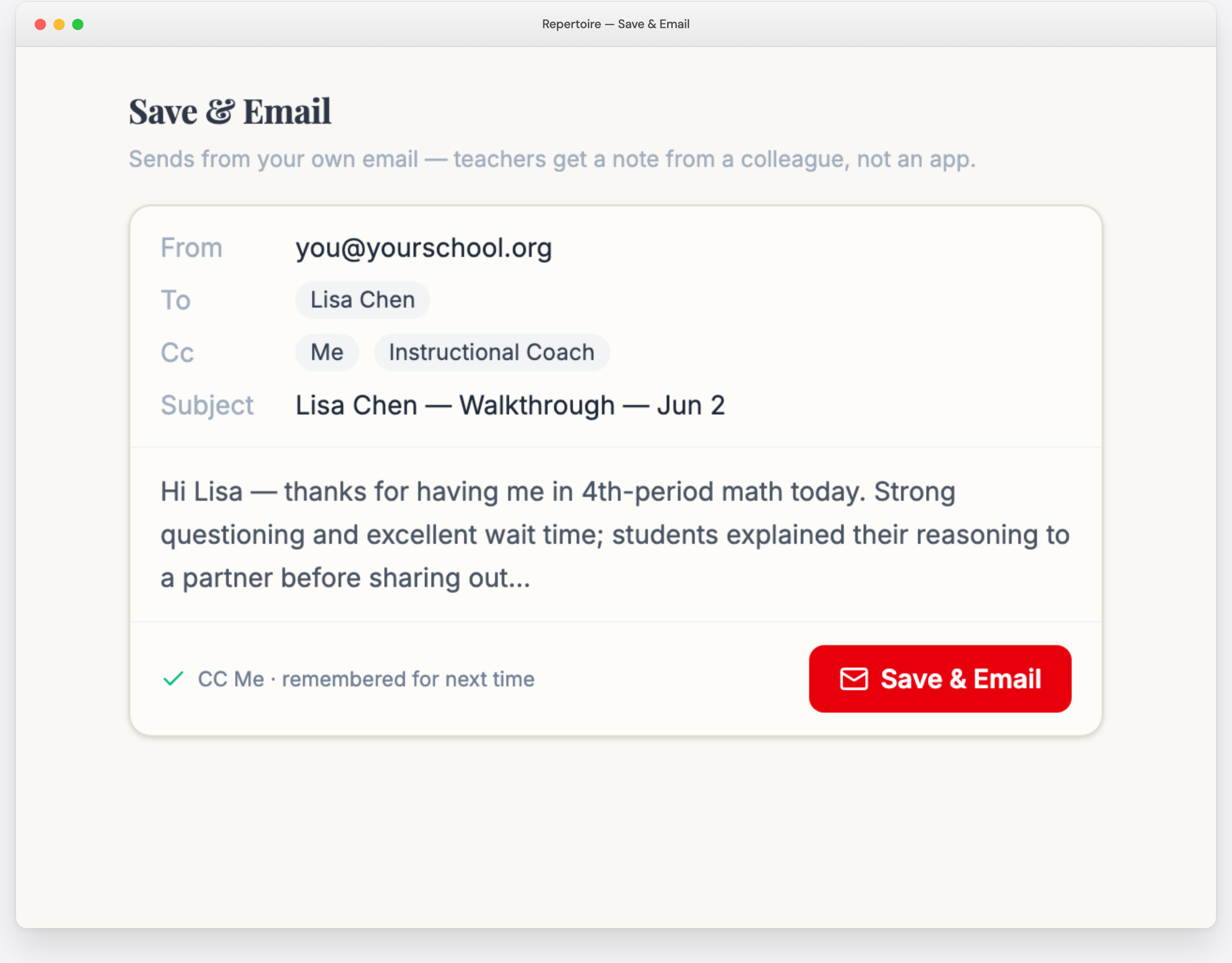
Tap Save & Email and the entry opens in your own email client, pre-addressed to the teacher. The message comes from your real email address — not a system notification. Teachers see a note from a colleague they trust. CC yourself, your AP, your instructional coach — up to 10 addresses, remembered between entries.
Daily Planner
Plan Your Day on Paper — Repertoire Reads It Back
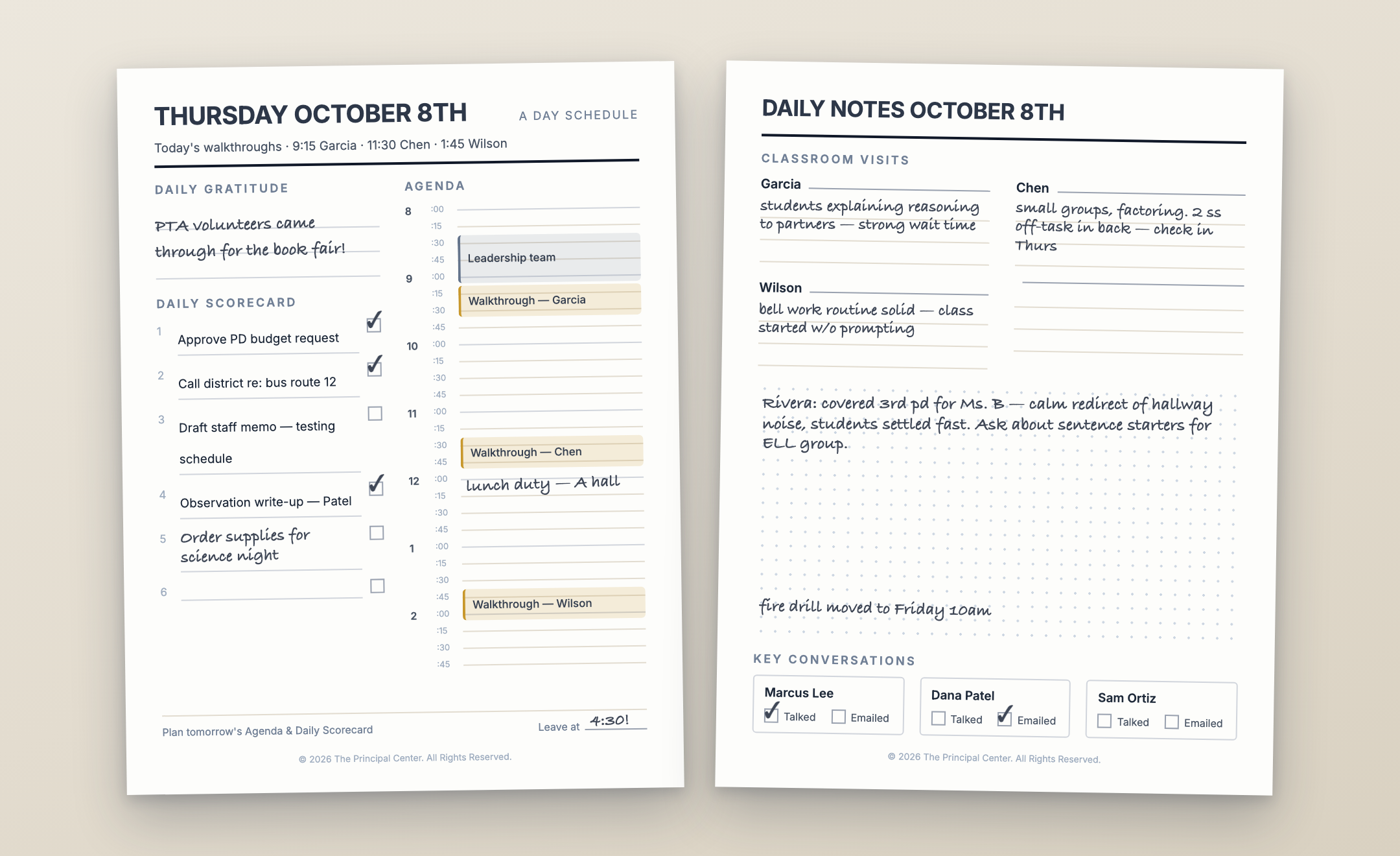
Print a personalized daily page and your walkthrough plan is already on it: scheduled visits with times — or your next-up teachers when nothing's scheduled — plus visit slots pre-printed with their names, your real bell schedule (A/B days and rotations included), and your calendar laid out hour by hour. Then carry it and write the old-fashioned way.
Photograph the Page. Approve. Done.
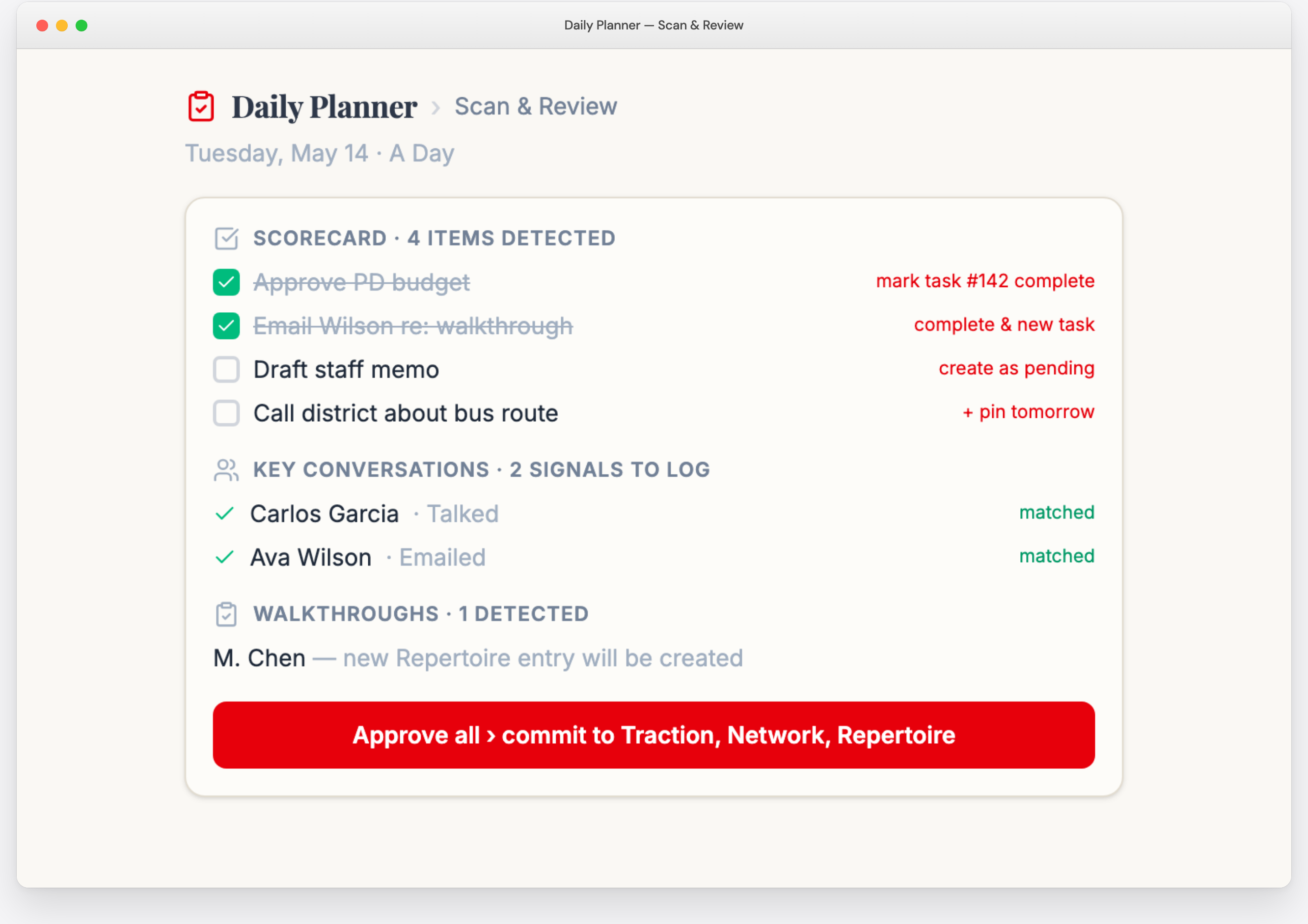
At dismissal, snap one photo of the marked-up page. Repertoire reads your handwriting — even pencil — and proposes an entry for every visit you jotted down: just start each note with the teacher's name, and it's matched to your roster with your words preserved exactly as you wrote them.
One tap to approve. Part of the Daily Planner, included with your ILA membership.
Beyond Walkthroughs
When Evaluation Season Comes, You’re Already Done
Every visit you log becomes evidence. When it's time to write summative evaluations, Repertoire finds the relevant moments from your own observation entries and pulls them into the write-up — organized by your district's framework and rating levels. And the Evaluation Tracker keeps the whole process on schedule: conferences, goal-setting, signatures, and observation counts for every teacher in one grid, with observation steps checked off automatically as you log entries.
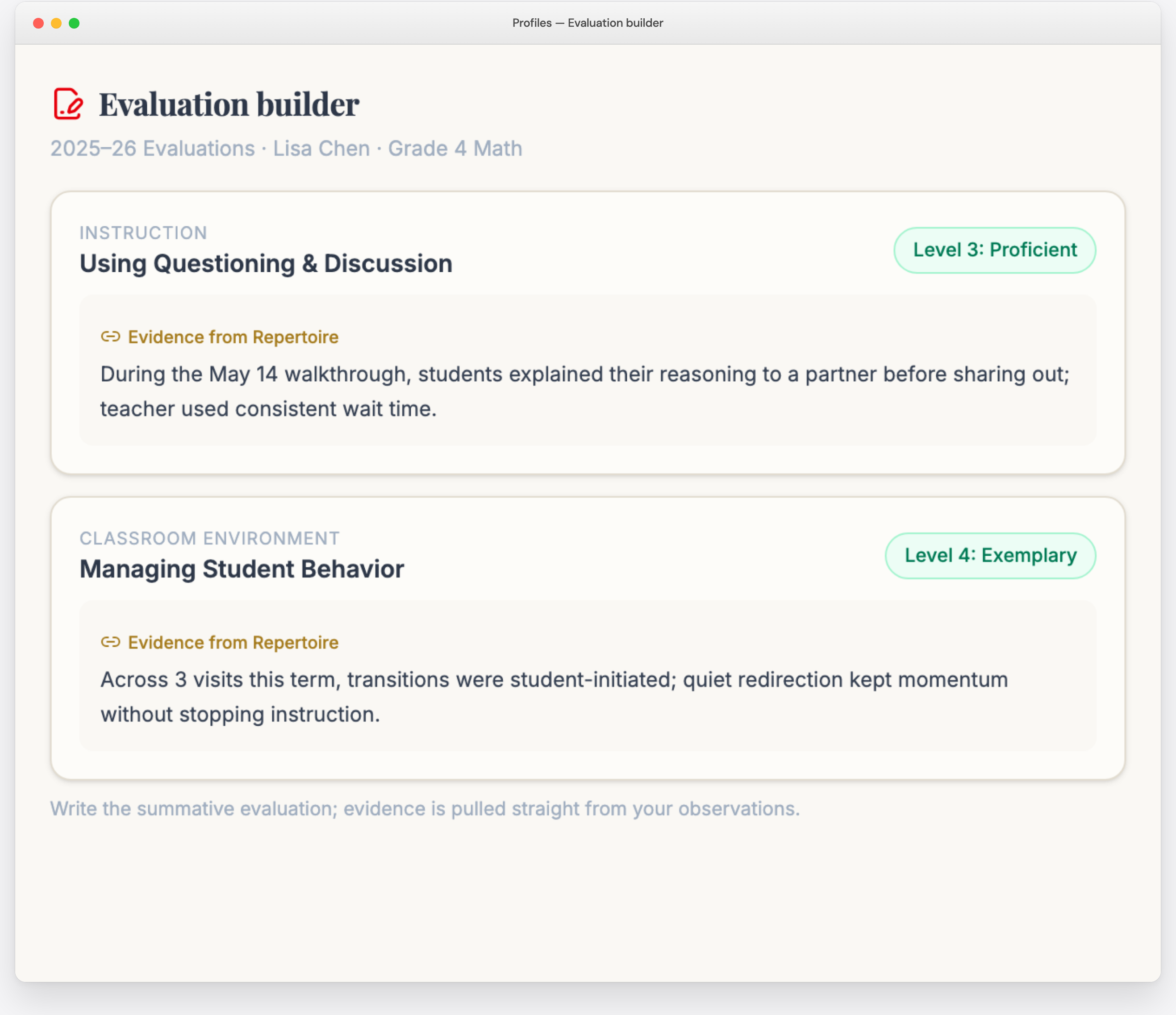
Write the summative evaluation with evidence pulled straight from your observations.
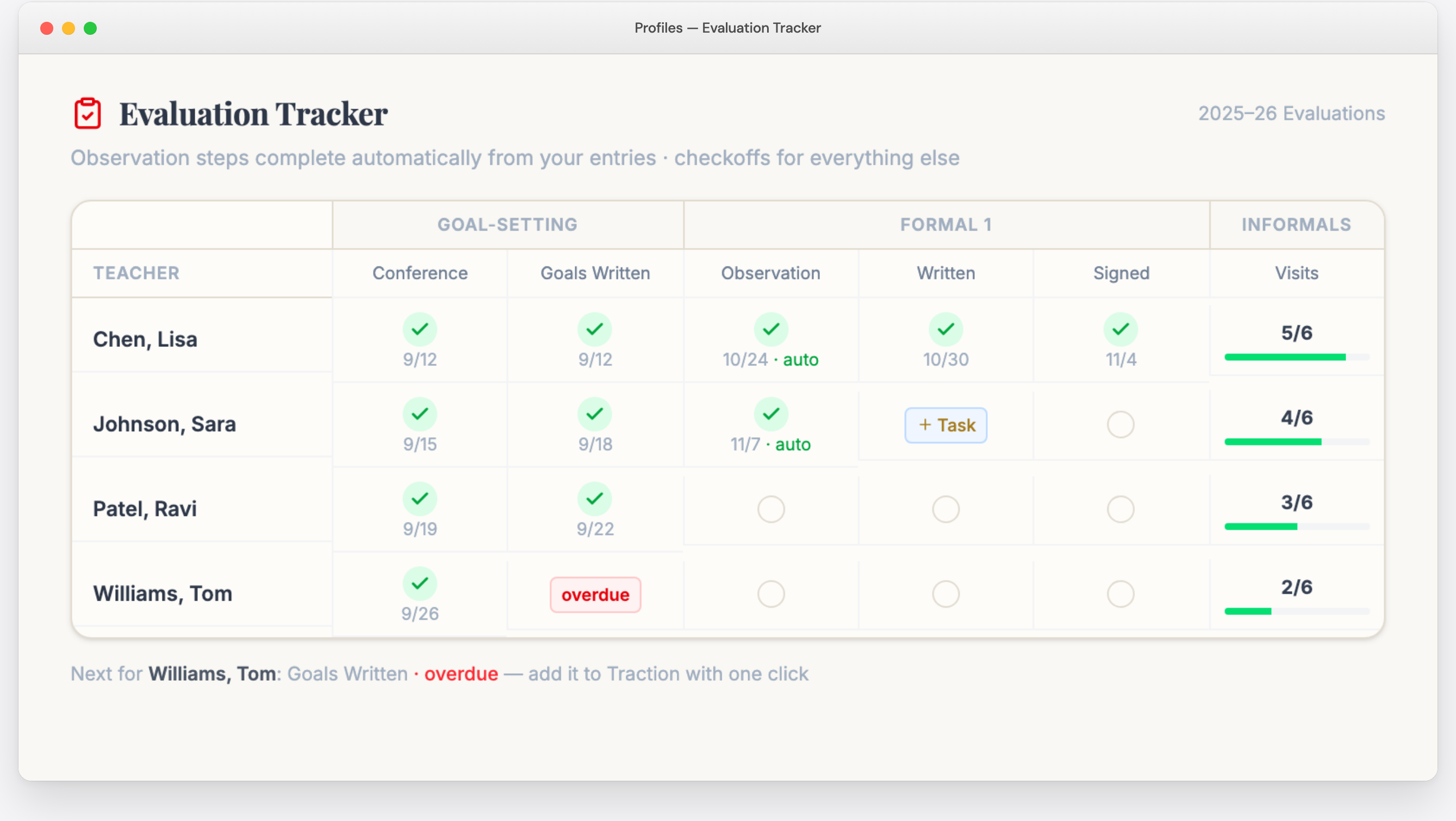
Track every step of every teacher's evaluation — observations complete automatically.
Also Included
Everything Else You Need
Roster & Coverage
Track visit counts and last-visit dates for every teacher. See who's been missed. Export your entries as CSV anytime.
Teacher Schedules
Know what subject and period you're walking into. Find free periods for follow-up. Supports block schedules, A/B days, and multi-day rotations. Scan a printed schedule with your camera — and print per-teacher pages showing your observation count for every period.
Portrait Quick-Start
A 5-photo challenge that gets you into a classroom on day one — and loads your roster and evaluation framework from two of the photos along the way.
Framework Collections
20+ pre-built snippet sets aligned to major evaluation frameworks. Activate yours and write in framework language from day one. Import a custom rubric via photo.
Printables That Talk Back
Prefer paper in the hallway? Print visit notecards for your whole roster, jot dates as you go, then photograph the card — Repertoire logs the visits for you.
Your Walkthrough Plan
An optional email that puts your Next Up teachers — with suggested visit times — in your inbox on the mornings you choose, plus one-click weekly check-in.
From the Field
What Principals Are Saying
“You have created an amazing tool for instructional leaders to provide meaningful feedback.”
Rick
Principal
“Repertoire is keeping me super sane this year! I love the organizing it brought to my brain this year. Staff appreciate the written emails after visits!”
Susan
Principal
“I’m enjoying my classroom visits — something I haven’t made time for in recent years, and the discipline of using the program is bringing a new energy and purpose to my work.”
Kate
Principal
The Difference
What Changes When the Friction Disappears
Visit every teacher, every week
Next Up ensures even coverage without a spreadsheet or checklist. No one gets overlooked.
Send feedback before you forget
The visit-write-send loop takes under a minute, so feedback goes out the same day — not days later.
Stop retyping your notes
Voice memos, handwritten notes, and forwarded emails become structured entries automatically.
Build your feedback vocabulary over time
Snippets save your best phrases so you get faster with every entry. The library grows itself.
Use your district’s evaluation language naturally
Framework-aligned snippet collections put the right words at your fingertips from day one.
Give feedback teachers actually read
Messages come from your email, not an app notification they'll ignore.
Know what you’re walking into
Teacher schedules tell you the subject and period before you arrive — and Next Up suggests the best time to go.
Walk into evaluation season prepared
Every visit is documented and searchable — and the evaluation builder pulls evidence straight from your entries.
Start in one session, not one weekend
Paste or photograph your staff list and your roster is loaded. Portrait walks you through the rest.
Make classroom visits a habit, not a chore
When the friction disappears, the visits happen naturally.
“I Don’t Have Time for Another Tool.”
That’s exactly right — you don’t. That’s why Repertoire was designed to be faster than what you’re doing now, not something extra on top of it.
If you’re currently writing feedback at all — in a notebook, an email, a Google Form — Repertoire replaces that workflow and makes it faster. If you’re NOT currently writing feedback because it takes too long, Repertoire makes it possible for the first time.
The principals who use Repertoire don’t spend more time on classroom visits. They spend less time on the admin work around classroom visits — and more time actually in classrooms.
Your First Semester
Here’s What the Path Looks Like
Where You Are
Averaging 1–2 classroom visits a week, if any. Feedback sent days later, if at all. Some teachers haven’t seen you since September. End-of-year evaluations mean reconstructing a semester from memory.
The Shift
Load your roster from a photo or a paste. Check Next Up each morning — or have it emailed to you. Lean on snippets and voice memos instead of typing. Send feedback within minutes of each visit.
Where You’ll Be
Two to three visits a day, every teacher on a regular rotation, feedback in inboxes the same period it happened. A complete, searchable record of the semester — and evaluation evidence already collected before you write a word.
Built by an Instructional Leader
Justin Baeder, PhD
Director, The Principal Center · Author · Former principal, Seattle Public Schools
Justin has spent more than a decade coaching school leaders on instructional leadership — specifically, how to get into classrooms consistently and give feedback that changes teacher practice. Repertoire is the tool he wished he had as a principal.
He’s the author of Now We’re Talking! 21 Days to High-Performance Instructional Leadership (Solution Tree) and host of Principal Center Radio, one of the most widely followed podcasts for school leaders.
Is Repertoire Right For You?
This Is For You If…
You’re a principal or AP who wants to be in classrooms every day but keeps getting pulled away
You believe feedback should happen the same day, not weeks later during a formal evaluation
You’ve tried notebooks, forms, and spreadsheets — and none of them stuck
You want even coverage across your whole staff — not just the teachers near your office
You value the personal touch of feedback from a real person, not an app notification
You’re tired of the end-of-year scramble to reconstruct observation data from memory
This is NOT for you if…
You’re looking for a gotcha tool to build a paper trail against teachers
You only do formal observations and don’t see value in informal walkthroughs
You’re not willing to commit to visiting classrooms — no app can do the walking for you
Pricing
Join the Instructional Leadership Association
Repertoire is included in the ILA membership, along with the Instructional Leadership Show, courses, Marshall Memo, and everything else you need to lead instruction.
$99/mo
Cancel anytime · No long-term commitment
14 days free · No credit card required · Cancel anytime
Frequently Asked Questions
How long does setup take?
One session. Paste your staff list from a spreadsheet or photograph a printed roster, and Repertoire builds your roster for you. The Portrait quick-start challenge walks you through the rest — including activating your evaluation framework from a photo.
Does this replace my district’s evaluation platform?
It can. Repertoire includes evaluation cycles, an evaluation writer that pulls evidence from your observation entries, and a tracker for every step of the process. Many principals do their evidence collection and writing in Repertoire, then copy into a required district system.
Can I use this on my phone?
Yes. Repertoire runs in the browser on any device, and the Captures companion installs on your phone's home screen like any app — so recording a voice memo or scanning a note is one tap from your lock screen.
What if I don’t use a standard evaluation framework?
Import your own by snapping a photo of your rubric or criteria document, or build custom snippet collections from scratch.
Does the feedback really come from my email?
Yes. Save & Email opens your own email client. Teachers see a message from you — not a notification from an app.
How is this different from Google Forms or a spreadsheet?
Speed and follow-through. A notebook can't email your feedback. A Google Form can't tell you who to visit. A spreadsheet can't transcribe your voice memo. Repertoire handles the entire observe-write-send loop in under a minute.
Can my AP or instructional coach use it too?
Yes — everyone on your admin team can use Repertoire, individually or as part of an organizational account.
What happens to my data if I cancel?
Export everything as CSV before you go. Your observation records are yours.
Your Teachers Are Waiting to Hear From You
Every day you’re not in classrooms is a day your teachers don’t hear from you. Not because you don’t care — because the system around you makes it too hard.
Repertoire takes the friction out. One tap to know who to visit. One tap to write the feedback. One tap to send it before you reach the next door.
14 days free · No credit card required · Cancel anytime