
Instructional Leadership Association
Get into classrooms every day and keep a record of every visit. Repertoire suggests who to visit next. You take notes on paper, by voice, or by typing, and write evaluations from a year of visits. Built on Now We're Talking! Try it free for 14 days.

Confidently get into classrooms every dayHave feedback conversations that change teacher practiceDiscover your best opportunities for school improvement
Repertoire, our classroom walkthrough app, suggests which teacher to visit next. You can take notes by hand, by voice, or on your phone, and send the teacher feedback instantly. When evaluation season comes, you write each evaluation from the visits you logged all year.
No credit card required.
The book behind the tools
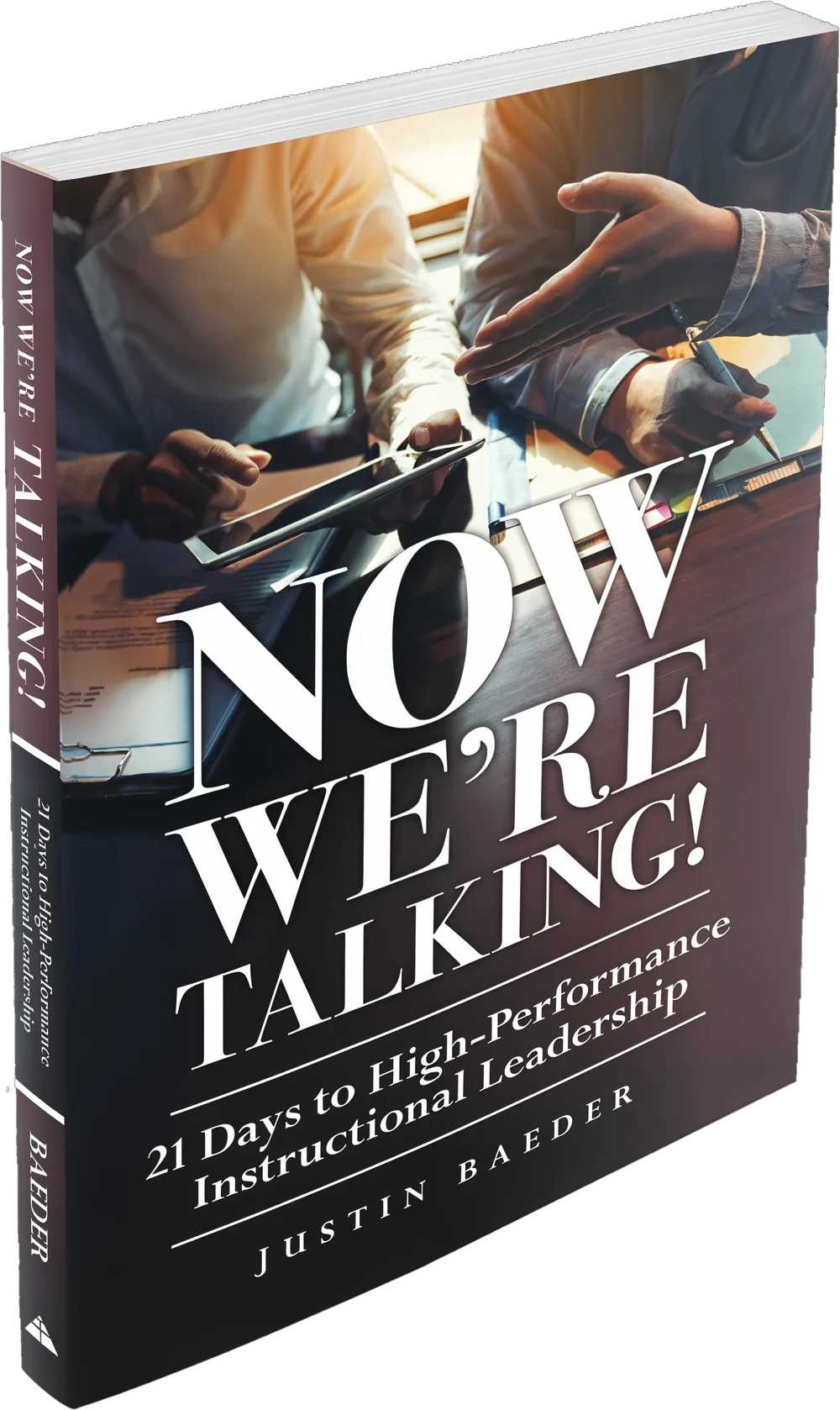
Now We’re Talking!
21 Days to High-Performance Instructional Leadership
Justin Baeder, PhD · Solution Tree Press · Over 15,000 copies sold
Principals say instructional leadership is their top priority. Research on how they actually spend their time found 5.4% going to classroom visits and 0.5% to coaching teachers. That works out to less than 10 hours a year with any one teacher.
Now We’re Talking! is a 21-school-day guide to closing that gap. It grew out of the Instructional Leadership Challenge, which more than 15,000 school leaders in over 50 countries have taken. The book shows you how to make time for classroom visits, keep them going through a principal’s real schedule, and turn them into conversations that change teacher practice.

Every ILA member gets the print book and the audiobook.
7 Keys to Sustainable Impact, built into Repertoire
The book describes seven keys that make classroom visits worth doing and worth keeping up. Repertoire was built to make each one practical on a busy day.
| The book says visits should be… | In Repertoire, you… |
|---|---|
Frequent about 3 visits a day, roughly 18 per teacher per year | Get suggested teachers every day, rotate through your staff with Next Up, and track your count toward 500 on the Scoreboard |
Brief 5 to 15 minutes | Talk it in on your way down the hall, or send a two-line quick thanks |
Substantive focused on teaching and learning | Write about what students were doing and learning, with entry types you define |
Open-ended the teacher is the expert | Take open notes in your own words, with room for what you didn’t expect to see |
Evidence-based low-inference descriptive notes | Add timestamped lines as you observe, so you can point to specific moments |
Criterion-referenced linked to a shared framework | Pull phrases from your evaluation rubric as you type, and import your district’s framework from a photo |
Conversation-oriented leading to conversations that change teacher practice | Find the best time for a feedback conversation in each teacher’s schedule, and use the 10 Questions to guide your discussion |
What’s in the book
Twenty-one short chapters in four weeks. Read one each school day and put it into practice.
Week 1 · Days 1–5
High-Performance Instructional Leadership
Why leaders belong in classrooms, the seven keys, and your first two cycles of visits.
Week 2 · Days 6–10
High-Performance Habits
Making time for visits, keeping email and interruptions under control, and building habits that save mental energy.
Week 3 · Days 11–16
High-Impact Instructional Conversations
Evidence-based conversations, bringing your framework into the conversation, handling the toughest conversations, and building your feedback repertoire.
Week 4 · Days 17–21
High-Performance Systems
Fitting visits together with formal evaluation, spotting patterns across classrooms, choosing an instructional focus, and scaling visits across a school or district.
The 3-Cycle Startup Plan
Visit every classroom on Day 1
Most principals who want to visit classrooms more start by trying to do everything at once: visit, take notes, and give feedback. Teachers get spooked, written feedback takes too long, and within a few weeks, the visits stop. The 3-Cycle Startup Plan from Now We’re Talking! builds the habit in stages. You visit first, and you add notes and feedback once visits feel routine to you and your teachers. Members get the printable plan and the tools to run it.
Cycle 1
Every Classroom
On Day 1
Make a brief appearance in every classroom you supervise. Take no notes and give no feedback. This cycle is relationship work: it breaks the ice, so teachers get used to seeing you in their rooms.
- Print a Rotation Sheet with your whole staff on one page, and check off each teacher as you visit.
- Then click I visited everyone in Repertoire, and it logs a quick visit for every teacher. Your Scoreboard count starts here.
Cycle 2
The Daily Three
Starting Day 2: three visits a day for about two weeks
Now go beyond visibility. Visit three teachers a day, and stay 5 to 10 minutes. Pay attention to the teaching and learning, show interest, and soak in what’s happening. You don’t need to worry about notes, evidence, or feedback yet. In about two weeks, you’ll have seen every teacher a second time, and at three visits a day, you’ll make about 500 visits over a school year.
- Pick an order, such as by hallway or by team, and stick to it. If you jump around, you’ll drift toward the teachers who are easiest to visit and start missing the rest.
- Your Visit Notecards keep the order for you: visit the top three cards, then move them to the bottom of the stack. Next Up does the same in Repertoire, and your Walkthrough Email suggests three teachers each morning.
- Piggyback visits on times you’re already out of the office, such as arrival, passing periods, and lunch duty.
Cycle 3
Notes & Conversations
Once visits are a habit
Now add brief notes and feedback conversations built on what you saw. Ask how questions about the teaching, and start from specific moments in the lesson.
- Write on your planner page, use Talk it in, or type on your phone. Send the teacher feedback with Save & Email.
- The 10 Questions printed on the back of every Visit Notecard give you ways to open the conversation.
- Your notes go to the teacher, so there’s no secret file. You both keep the same record of what you saw.
14 days free. No credit card required.

What Repertoire does
Repertoire is the app you open before, during, and after every classroom visit.
See every teacher
Keeps track of your rotation
Repertoire keeps a record of every visit: the teacher, the date, and the class you saw. You don’t need a clipboard tally or a spreadsheet.
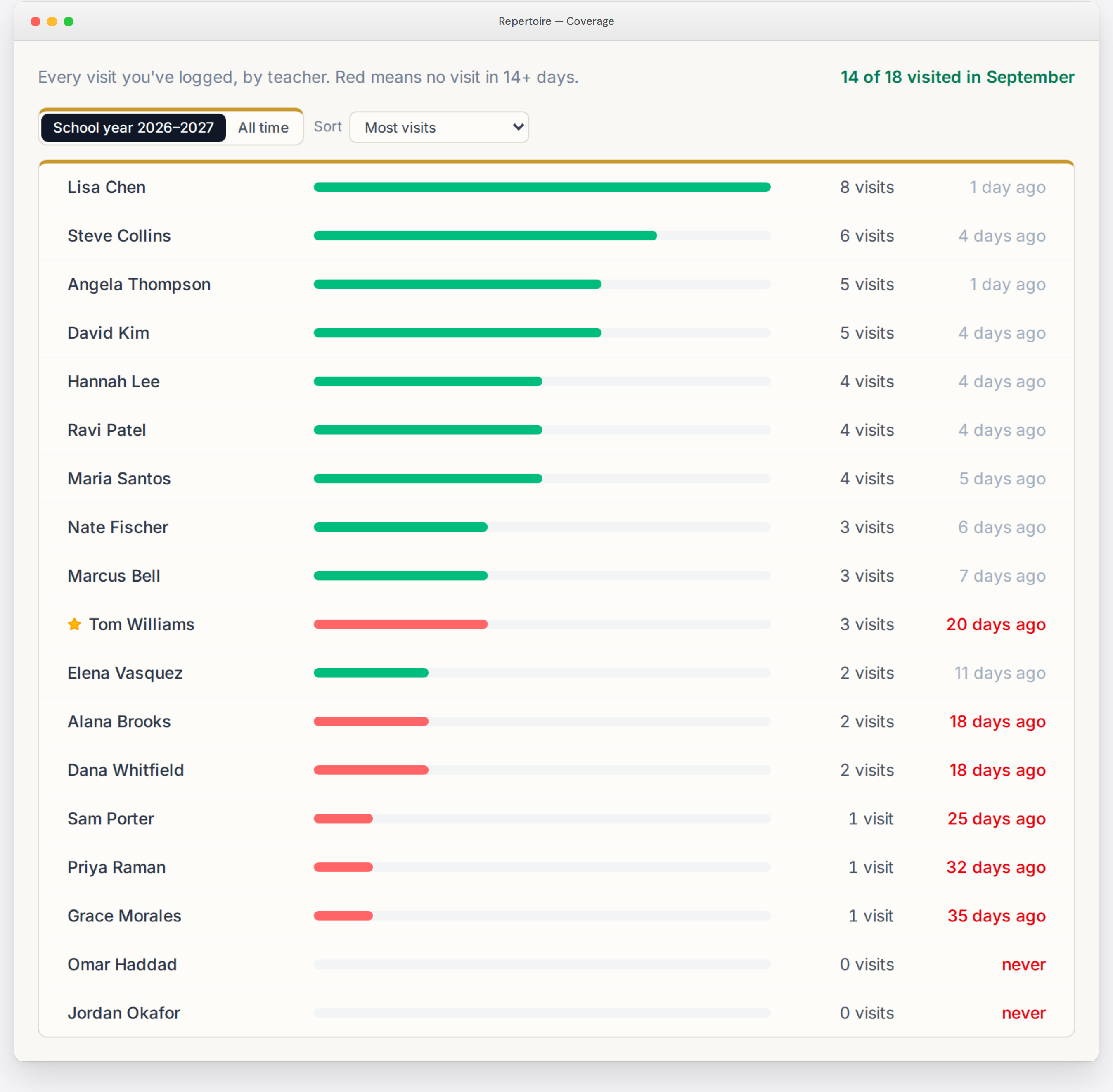
Visit Coverage: see every teacher’s visit count for the school year and the days since your last visit. Teachers you haven’t seen in 14 days show in red, so you can spot gaps before they grow.
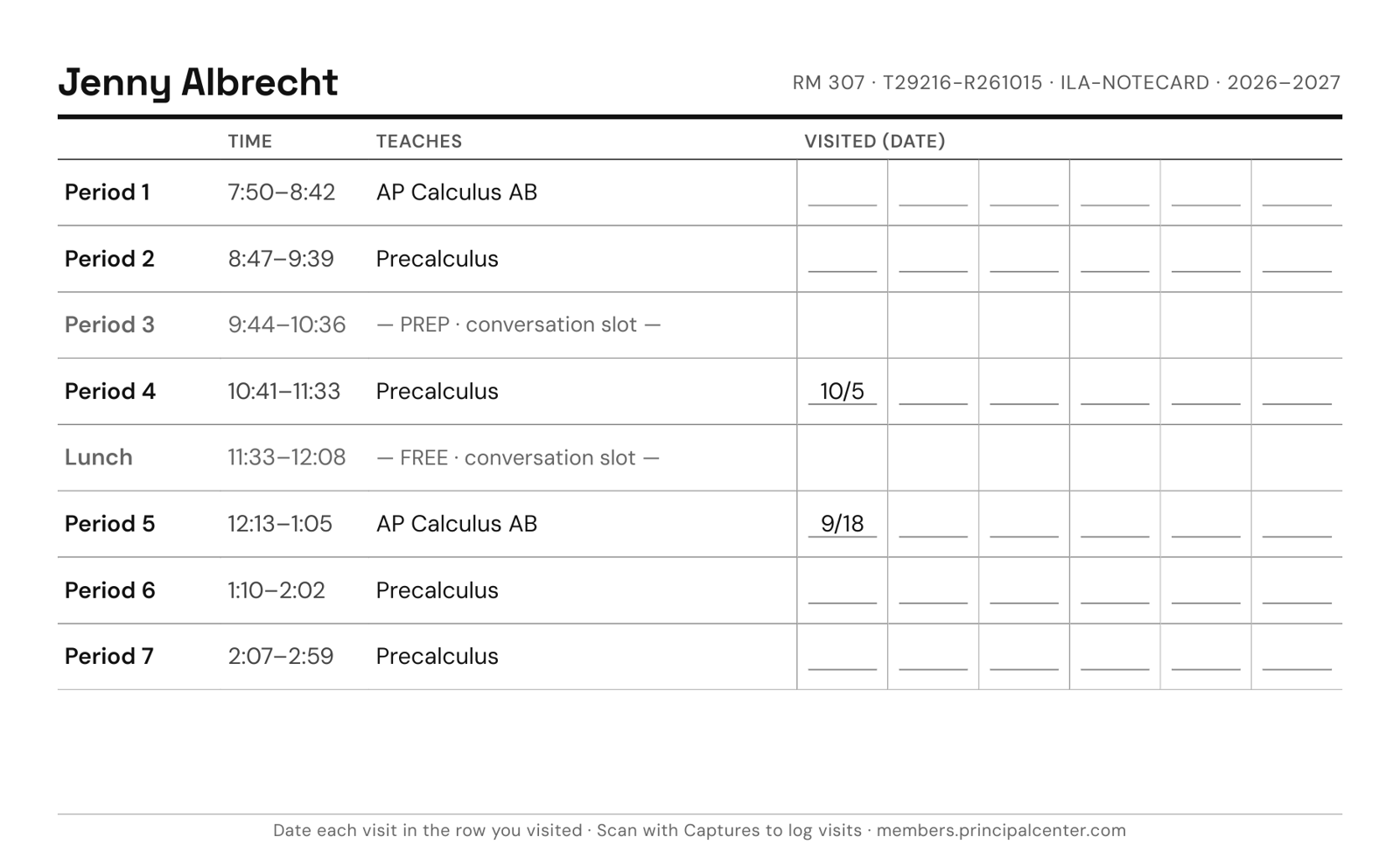
Visits by period: each teacher’s page shows their schedule with a visit count beside every class, so you can see which classes you’ve watched and which you haven’t seen yet.
Monthly progress: see how many of your teachers you’ve visited this month.
Export: download your visits as a spreadsheet for one teacher or your whole staff.
Teacher schedules
Puts teacher schedules at your fingertips
Every teacher’s schedule is one click away, on your phone or your laptop, and on paper when you want it.
Take a photo to add a schedule. Photograph the schedule posted outside a classroom, or the master schedule from the office, and Repertoire reads it in. You check it and save.
A/B days, block days, and early release: add as many schedules as a teacher needs. Set your school’s rotation once, including one-off changes like half days or snow days, and Repertoire shows each teacher’s schedule for today.
Prep periods marked: lunch, prep, duty, and advisory periods are highlighted, so you can find the best time for a feedback conversation with each teacher.
The class is filled in for you: when you start an entry, Repertoire matches the time to the teacher’s schedule and fills in the period and subject.
On paper too: print a Visit Notecard for each teacher with their schedule, prep periods, and the dates you’ve visited, or print the master schedule as one grid.
Who to visit next
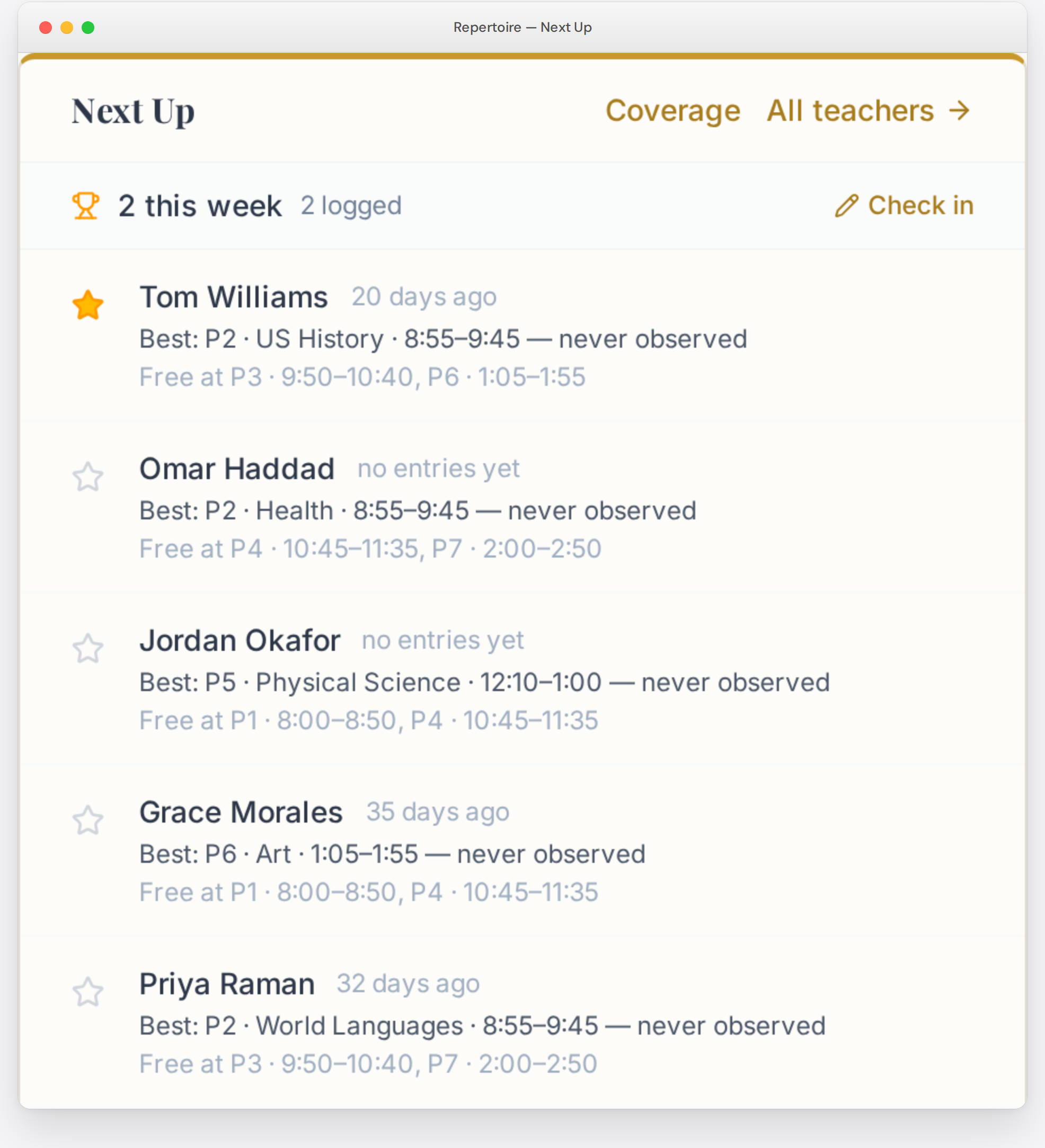
Helps you decide which classes to visit next
Open Repertoire, look at Next Up, and go.
Next Up puts the teachers you haven’t seen at the top, with the best class to visit today: one you haven’t observed yet that has at least 10 minutes left. Over the year, you see each teacher across different classes and times of day.
Star or skip: star a teacher to see them next, and the star clears when you log the visit. Skip a teacher for today when they’re out or testing.
The Walkthrough Email brings the same list to your inbox on the days you choose, with a button that opens a new entry for each teacher.
Paper, voice, or typing
Captures your handwriting, voice, or typing before you’re back in the office
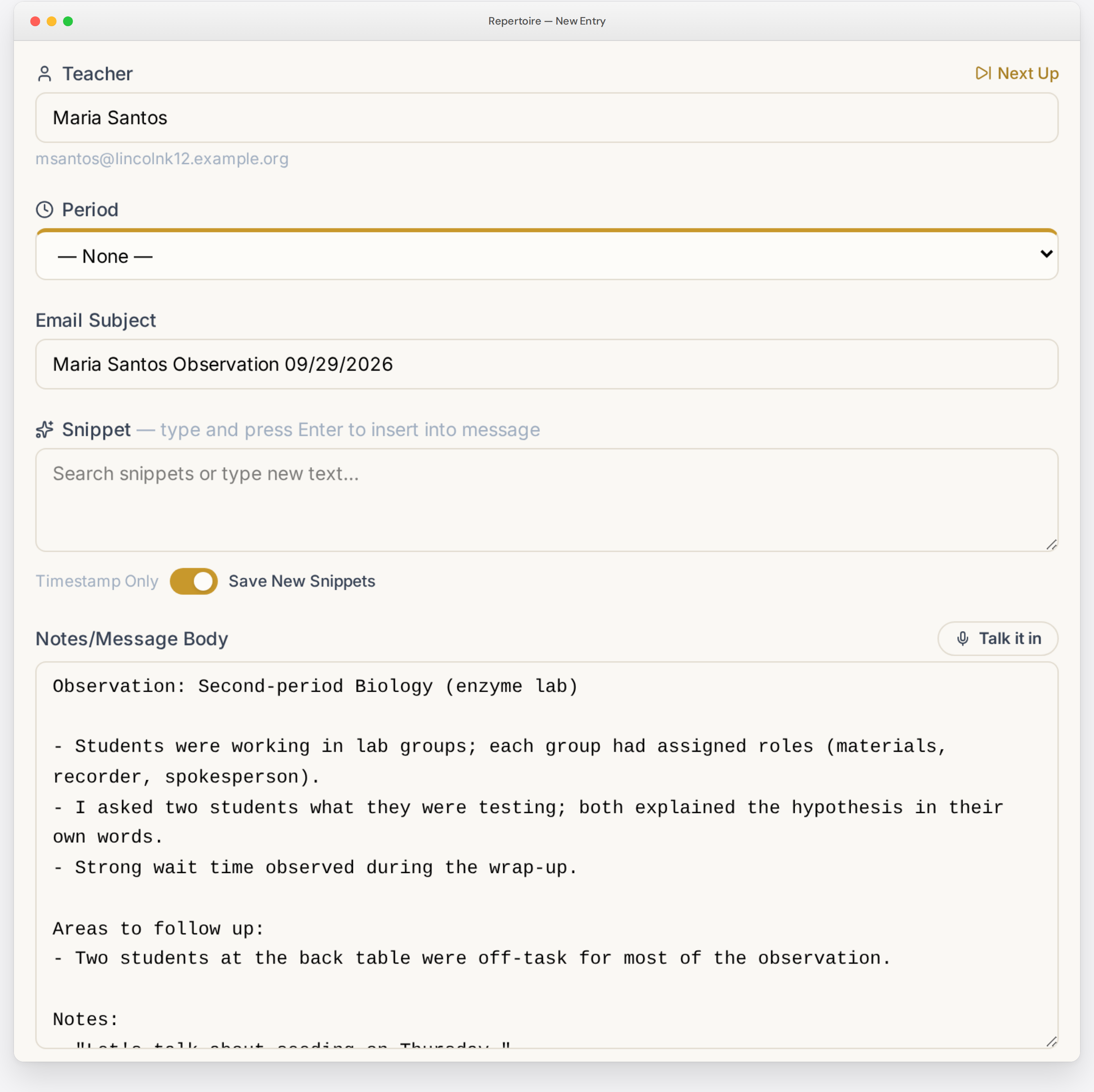
Take notes any way you want:
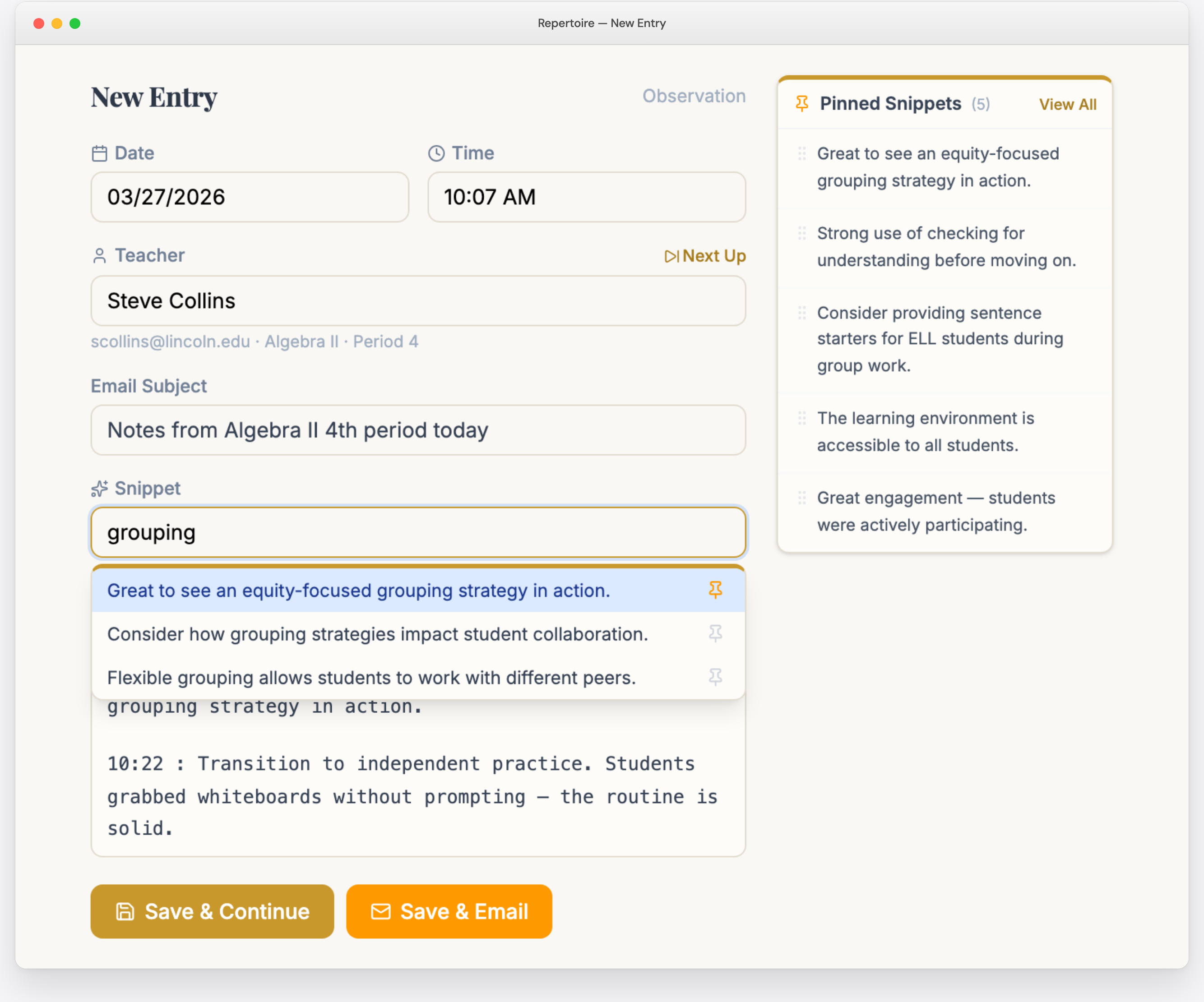
Typing: open an entry on your phone or laptop and type as you watch. Tap to add a timestamped line so you can point to specific moments later. Your favorite feedback phrases come up as you type, including the language from your evaluation rubric.
Voice: step into the hallway, tap Talk it in, and describe what you saw. About 20 seconds after you stop, clean notes appear in the entry, with the teacher matched to your roster.
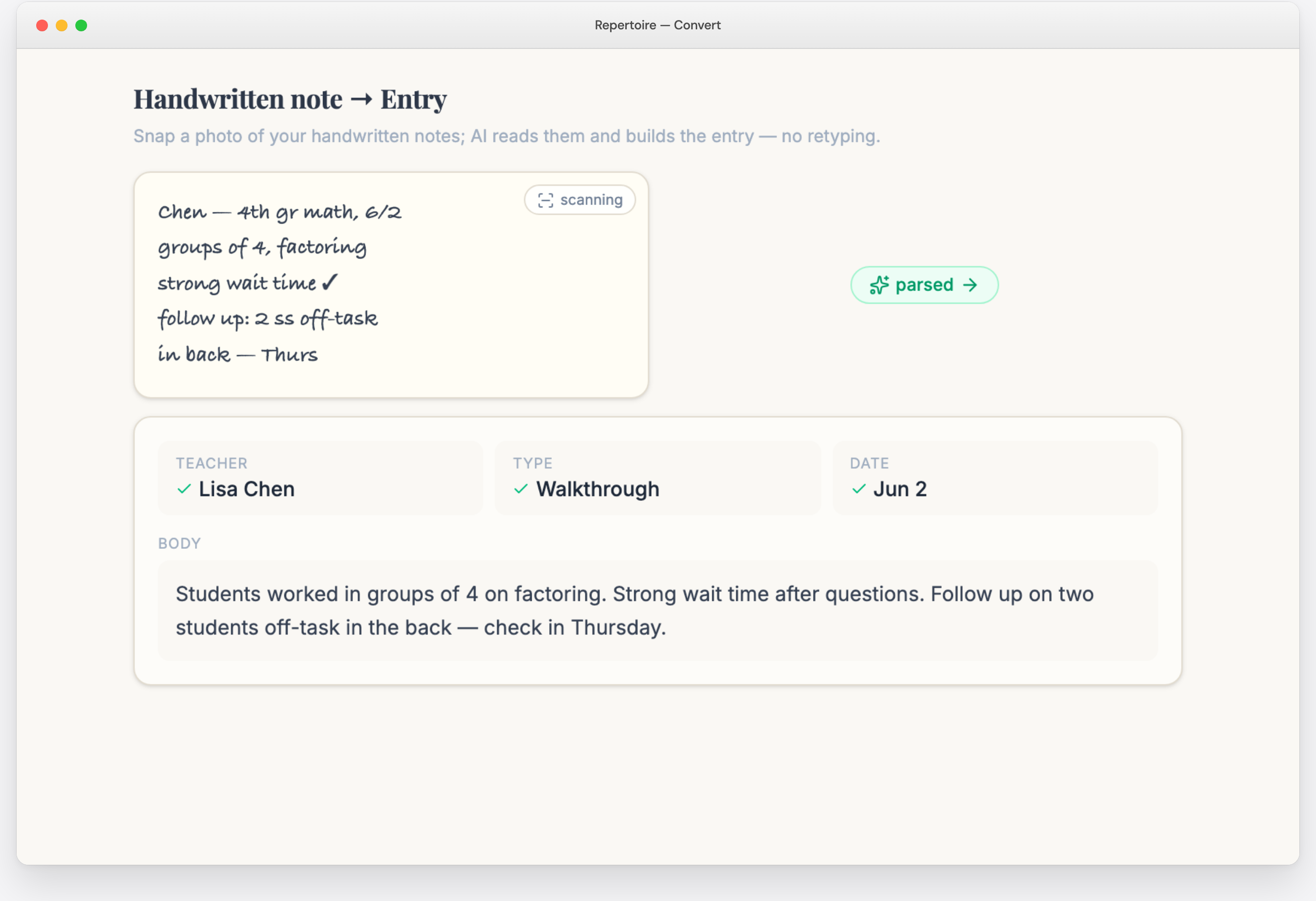
Handwriting: write on your planner page or a sticky note. Take a photo, and Repertoire reads your handwriting and turns it into an entry with the teacher, date, and notes filled in. Many teachers appreciate a handwritten note, and you still get a typed record you can search and email.
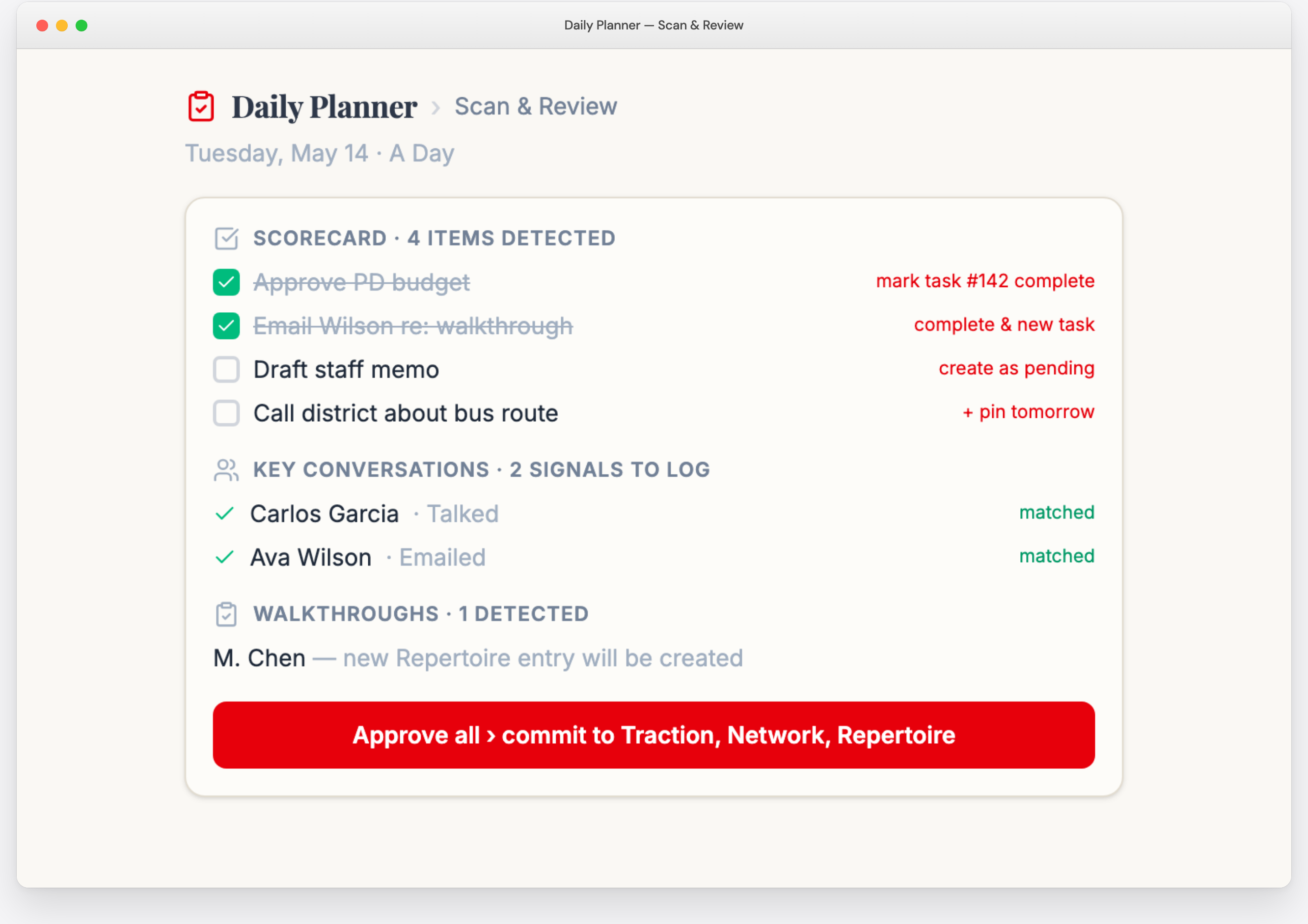
End-of-day scan: photograph your Daily Planner page. Lines that start with a teacher’s name become draft entries, checked-off tasks are marked done, and new tasks you wrote in are added. You review every item before it’s saved.
Notecard scan: photograph a filled-in Visit Notecard, and each date you wrote is logged as a visit.
No homework
Sends feedback instantly
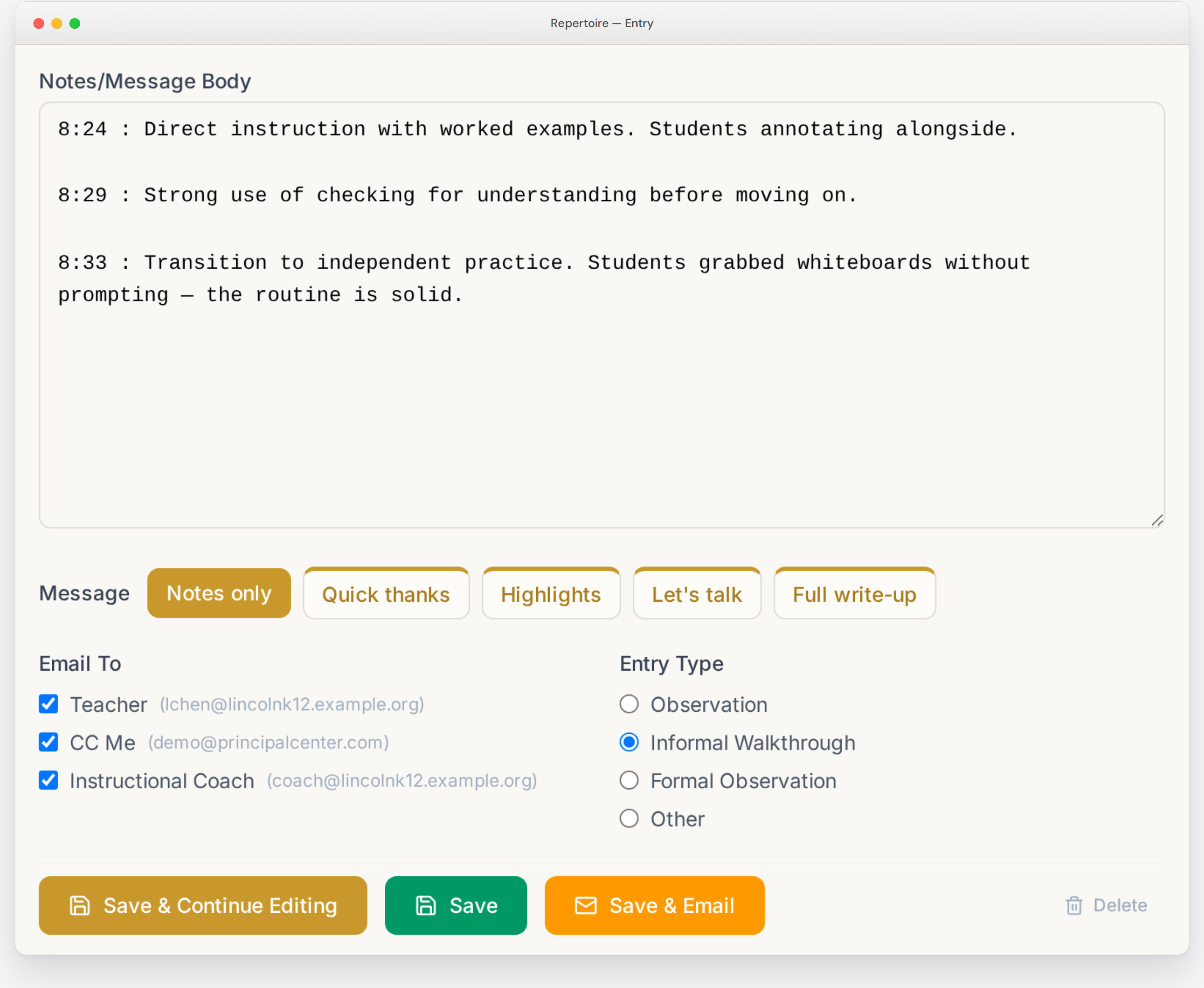
Pick an outline, read it over, and send. The teacher gets your feedback right away.
Pick how much to write: Notes only, Quick thanks, Highlights, Let’s talk (ask for a conversation), or Full write-up. Each option gives you an outline you can edit, and you can change the wording to sound like you.
Save & Email sends the feedback from your own email address, so it reads as a message from you.
CC whoever needs it: send yourself a copy, and add an assistant principal, coach, or HR to the CC list once.
Motivation and accountability
Make your walkthrough habit visible with the Classroom Walkthrough Scoreboard
You plan to get into classrooms every day. Then a parent calls, a bus runs late, or a meeting runs long, and the visits slip to next week. The Scoreboard gives you a number that goes up every time you visit a class, and a reason to get out of the office.

Motivation you can see
Every visit adds to your count, and your progress bar fills toward 500 walkthroughs. On a day when you only get to two classrooms, you can still see those two visits count.
Accountability that forgives a hard week
Your count is cumulative. It never resets, and there’s no streak to break. When testing, a staffing crisis, or a week of meetings keeps you out of classrooms, your total is still there when you come back, and you keep adding to it. That makes it easier to restart after a rough stretch, which is when many leaders give up on visiting classrooms.
A regular check-in
The Walkthrough Email asks how many classrooms you’ve visited this week, and you answer with one click. Knowing the email is coming is a prompt to get into a few more classrooms before it arrives.
Colleagues doing the same work
Opt in, and your progress bar appears on the ILA Scoreboard beside other members’ bars, under one combined total for all of us. You see other principals keeping up their visits through busy weeks of their own, and they see you doing the same. The Scoreboard shows totals and progress only. It doesn’t show weekly numbers, and it doesn’t list who fell behind.
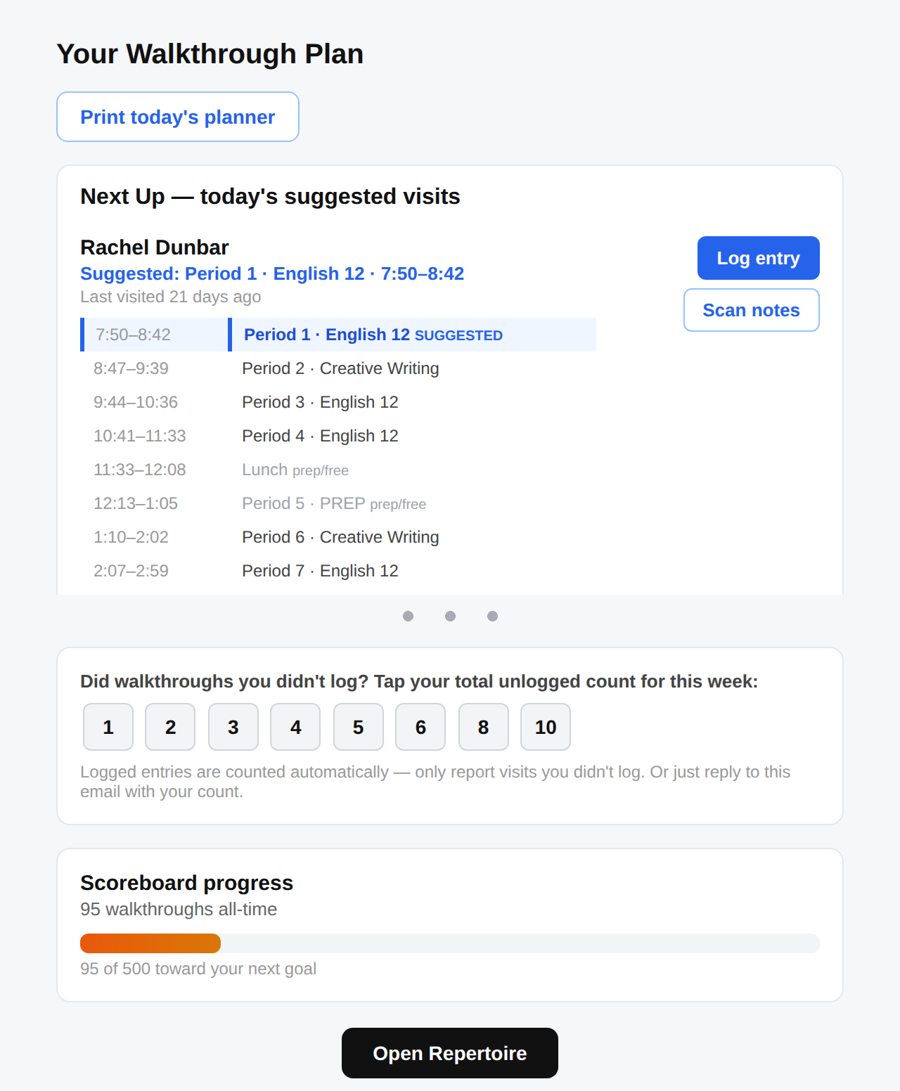
Counted automatically: every Repertoire entry counts toward your total. You choose which entry types count.
Report visits you didn’t write up: click a number in your Walkthrough Email, use Check in on the Repertoire dashboard, or reply to the email with your count.
A gold star at 500: you earn a star each time you reach 500 walkthroughs, and the count starts toward the next 500.
Private by default: your count is visible only to you until you opt in to the ILA Scoreboard.
Getting started
Set up in one sitting
You can load your roster and log your first visit on your first day.
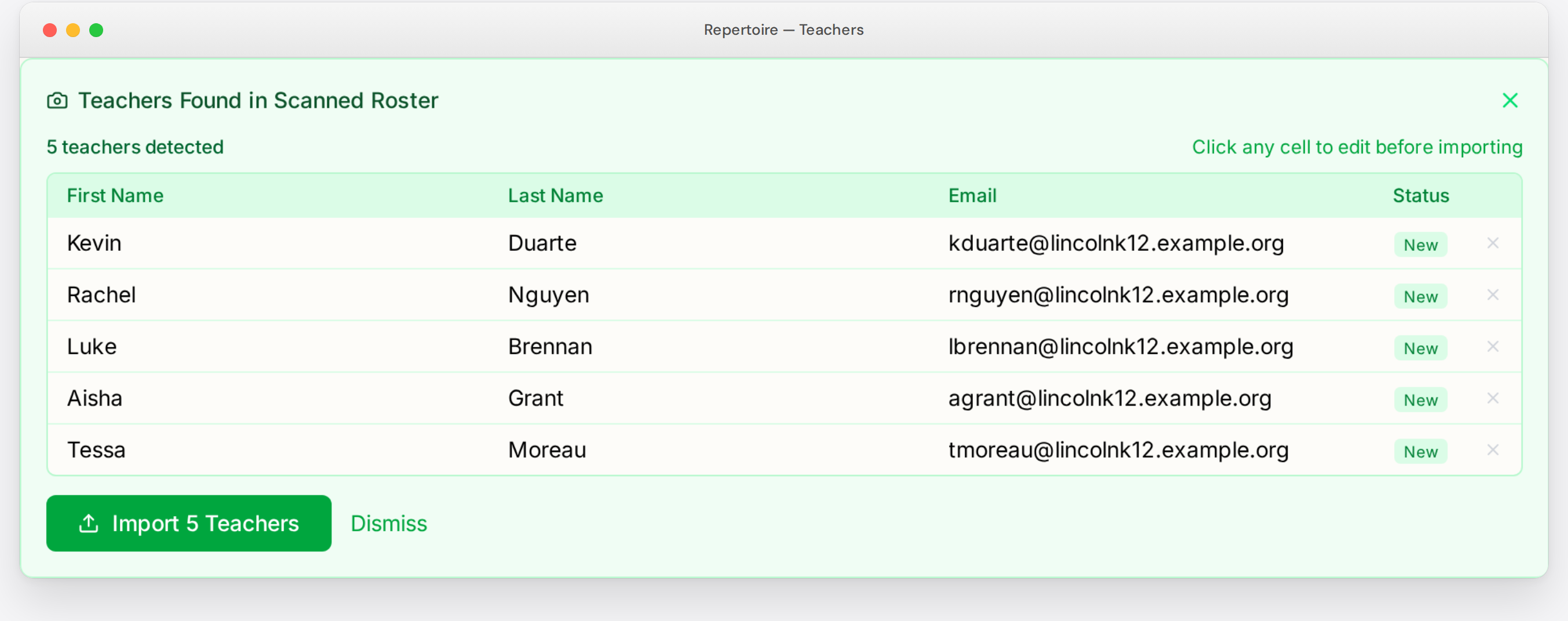
Your roster: paste staff names from a spreadsheet, a staff directory, or the To: line of an all-staff email. Or take a photo of a printed staff list. Repertoire finds the names and emails and skips teachers you’ve already added.
Your rubric language: turn on the phrase set for your state or national evaluation framework, or take a photo of your district’s rubric to import it.
Portrait: a five-photo setup challenge. Photograph a classroom door, student work, your staff list, a whiteboard, and your rubric. By the end, your roster is loaded, your rubric phrases are ready, and you’ve logged your first visit.
Paper and app, together
A day with Repertoire and the Daily Planner
Before school
Check your Walkthrough Email for today’s suggested teachers. Print your Daily Planner with your tasks and schedules for the teachers you’re due to visit.
During the day
Visit classes and take notes however you like: on your planner page, by voice, or by typing on your phone. Leave teachers handwritten notes, or email your feedback with one click.
End of the day
Photograph your planner page and your notecards. Repertoire logs the visits you wrote down, updates your task list, and records the conversations you checked off. Tomorrow’s planner prints with today’s visits already filled in.
Printables that stay in sync
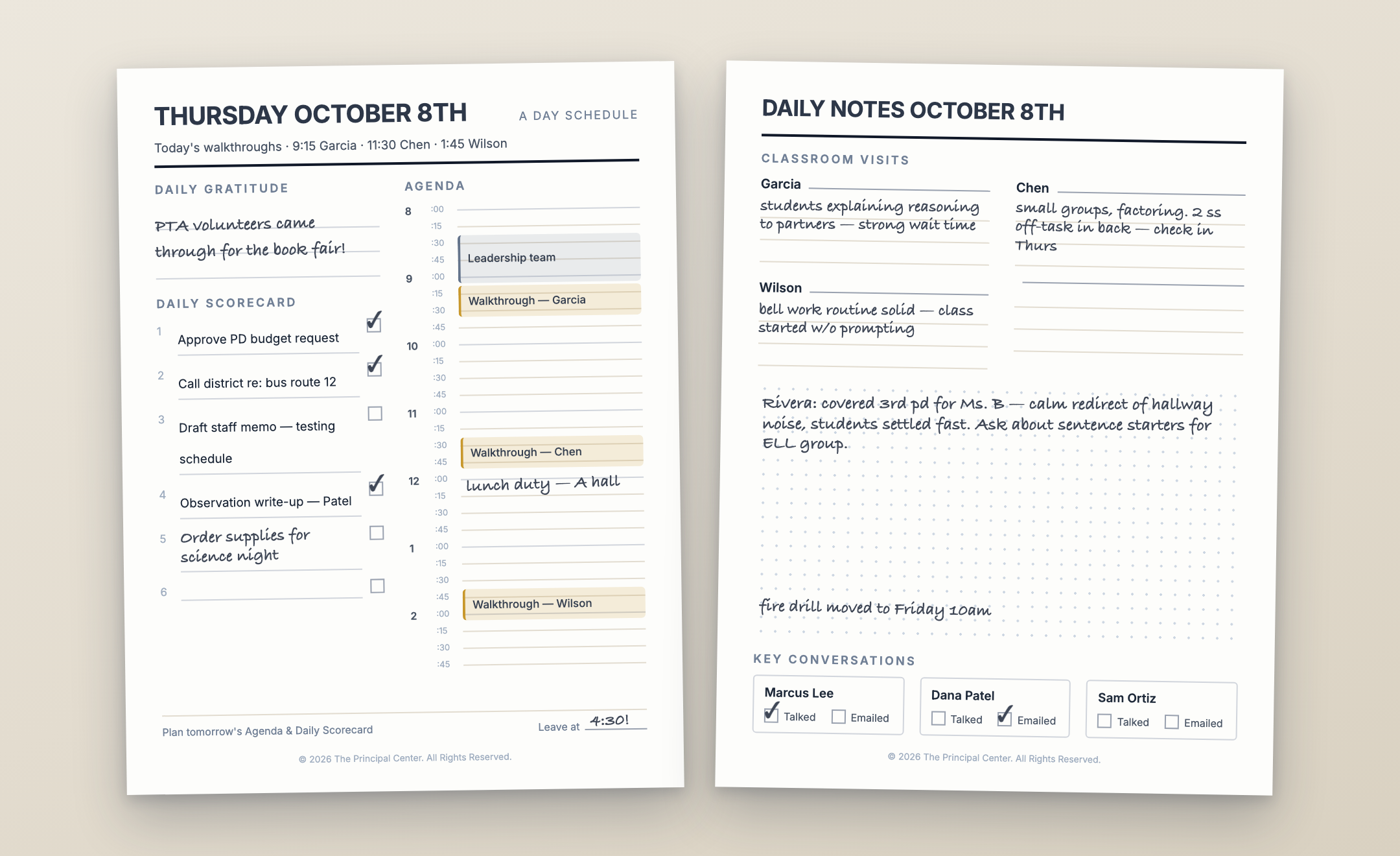
Repertoire prints from your real data, and you can scan the planner and notecards back in.
Daily Planner
Tasks and the teachers you’re due to visit, with their schedules.
Visit Notecards
One card per teacher with their schedule and visit dates. Print 4, 2, or 1 per page, or blank cards to fill in by hand.
Rotation Sheet
Your whole staff on one page, with room to check off five rounds of visits.
Master Schedule
Every teacher and period on one grid.
Feedback Phrase Bank
Your own saved phrases, printed.
Evaluation season
Write evaluations from the visits you already made
When evaluations come due, Repertoire keeps the process on track and puts a year of visits at your fingertips.
Evidence from Repertoire
Draw on a year of visits when you write each evaluation, organized by your district’s evaluation criteria.
Coverage and conflict flags
Before you finalize, you’ll see where your evidence is thin and where a rating conflicts with the evidence behind it.
Evaluation Tracker
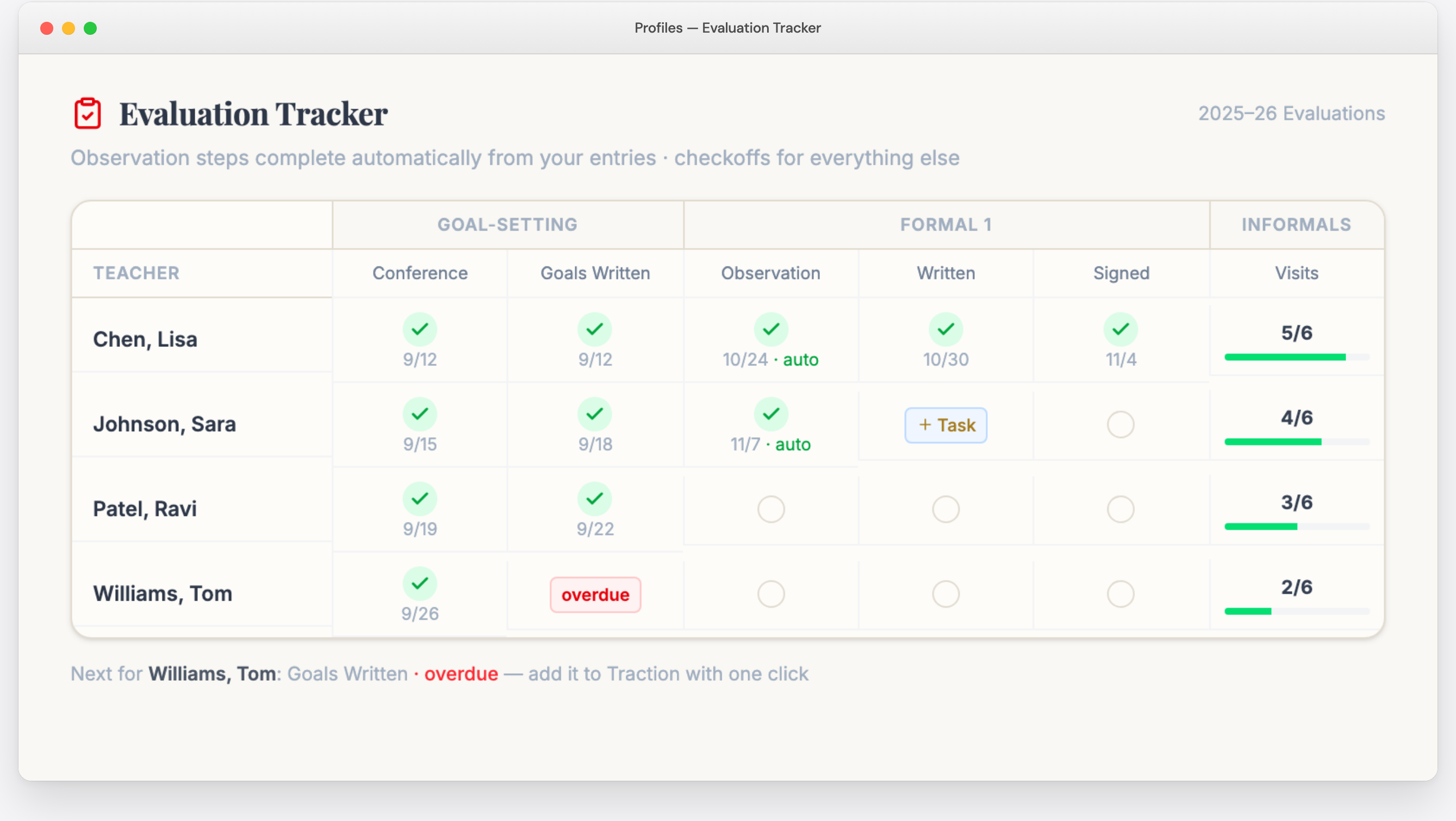
See every teacher you evaluate and every step in one grid: goal-setting conferences, formal observations, write-ups, and signatures. Customize the steps to match your district’s process. Observation steps are checked off when you write the entry, and overdue steps move to the top of the list.
Teacher Observation Record
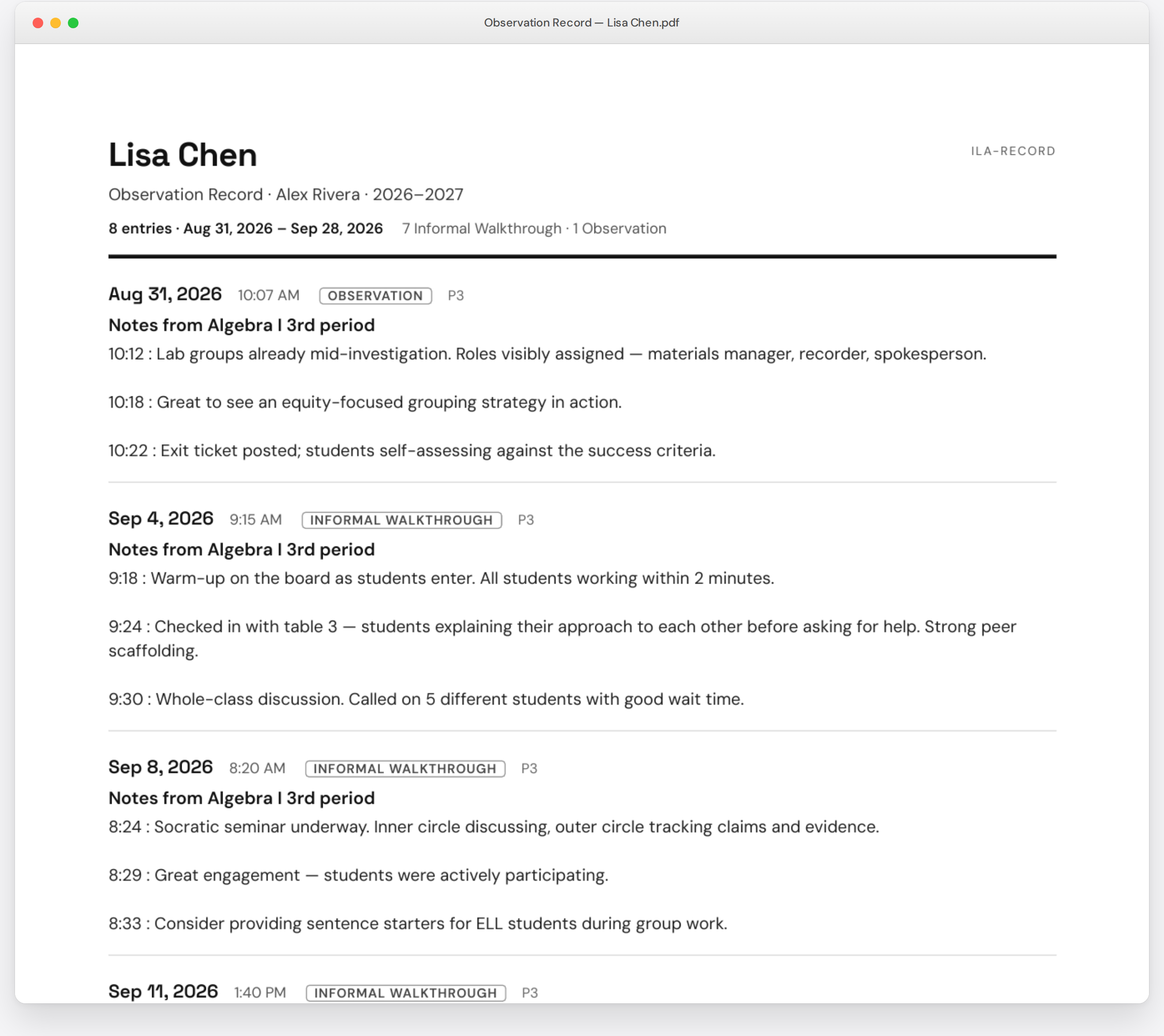
Print every observation for a teacher as one PDF, in order, with a summary of how often you visited. Bring it to the summative conference, or print it whenever HR asks, including for staff who have left.
The rest of your day, in the same place
- Traction: a task list sized for a principal’s day. Type a task in plain words and Traction picks out the due date.
- Network: a log of your conversations with each staff member, with reminders when you haven’t checked in.
- Notes: meeting notes and a daily note that collects your voice memos and planner scans.
- Captures: forward an email to your private capture address, and file it as an entry, a task, or a note.
Keep learning
- Instructional Leadership Show: a new video episode every week, for members only.
- Marshall Memo: Kim Marshall’s weekly summary of K–12 research, with the full archive.
- Instructional Leadership Challenge: the program that has helped 15,000 leaders get into classrooms every day. Members keep it even if they cancel.
- The Inbox Overhaul: email training to get your inbox under control.
- Now We’re Talking!: the print book plus the audiobook.
- Classroom Walkthrough Toolbox: tracker, index cards, feedback phrase bank, and scripts.
- Printable monthly planners.
Try everything free for 14 days
No credit card required. When your trial ends, choose a plan to keep using Repertoire and the planner. Your entries are saved if you join later.
Monthly
Cancel anytime.
Need group pricing or a purchase order? Contact us
30-day money-back guarantee
If you join and aren’t satisfied, we’ll refund your payment in full within your first 30 days.

About Justin Baeder, PhD
Justin Baeder, PhD, is Director of The Principal Center and a former principal in Seattle Public Schools. He created the Instructional Leadership Challenge and wrote three Solution Tree books on instructional leadership: Now We’re Talking!, Mapping Professional Practice (with Heather Bell-Williams) and Cultivate & Activate (with Keith Fickel). He hosts Principal Center Radio and works with school leaders across the US, Canada, and around the world on classroom walkthroughs, teacher evaluation, and instructional leadership. He holds a PhD in Educational Leadership & Policy Studies from the University of Washington.
Start Cycle 1 this week.
Set up your roster tonight, print your Rotation Sheet, and visit every classroom tomorrow.
No credit card required · $99/month or $999/year after your trial